



But it’s missing some marketing and automation features that come with other platforms.
So, is it worth compromising paying the price but missing out on the built-in marketing tools?*
* Thinkific now includes built-in email automation, but broadcast campaigns and advanced segmentation still need a third-party tool.
In this article, we’ll assess Thinkific’s pricing plans and highlight its most valuable features. We’ll also compare it to competing platforms and recommend alternatives for specific types of course creators.
 |
|---|
| ✅️ Best Software 2026 (Education) on G2.com
✅️ Rated 4.5 out of 5 from 404 reviews on G2.com ✅️ Buyers Choice 2026 on TrustRadius.com |
| Starting Price: $40/month (annually) |
| Thinkific is a reliable LMS platform with an intuitive course-creation process featuring variable lesson and assessment types. Communities are a core feature of the platform, and its built-in TCommerce checkout takes no platform cut of your sales. On top of that, Thinkific offers 90+ integrations, which support both the marketing operations and the learning experience of your business. |
| Try Thinkific free for 30 days (cancel any time during the trial) or Compare all Thinkific plans (from $40/month annually) |
Thinkific Pricing: In-Depth Look
Thinkific offers unlimited courses on every plan but reserves community monetization for Start and above.
| Basic Plan | Start Plan | Grow Plan | Plus Plan | |
|---|---|---|---|---|
| Pricing | $54/month
$40 (annually) | $109/month
$82 (annually) | $219/month
$164 (annually) | Custom
(talk to sales) |
| Video bandwidth | 100 GB/month
10,000 students | 200 GB/month
Unlimited students | 400 GB/month
Unlimited students | From 7,500 GB/month
Unlimited students |
| Products | Unlimited courses
1 Community 5 Spaces | Unlimited courses
1 Community 10 Spaces | Unlimited courses
3 Communities 20 Spaces | Unlimited courses
Multi-tenant Environments Learning paths |
| Customer Support | Live chat
Email support | Live chat
Email support | Phone support
Priority chat | Dedicated Success Manager
Launch Specialist |
| Additional Features | Custom domain
Order bumps and coupons | Paid memberships
Live lessons and certificates | White-label branding
API access and group orders | SSO, SCORM, and CRM
Thinker AI assistant |
Thinkific offers four plans: Basic, Start, Grow, and Plus. On annual subscriptions, you’ll get roughly a 25% discount on the three self-serve plans — that’s $173 a year off Basic, $330 off Start, and $660 off Grow.
Two things have changed since Thinkific last reshuffled its pricing. The free lifetime plan is gone, and so is the old Expand tier. Every plan now opens with a 30-day free trial instead, and Plus — the enterprise tier — is quoted by sales rather than published.
Thinkific Basic Plan: $54/month
The Basic plan is Thinkific’s most affordable plan. It costs $54 per month for monthly payments and $40 per month for the annual pricing option.
It’s the entry point to the platform, and it already covers what most creators need to start selling: an unlimited number of published courses, one community with five spaces, five digital downloads, and five coaching or webinar sessions. The checkout is fully stocked too, with order bumps, coupon codes, gifting, and abandoned-cart emails.
In terms of branding, you’ll be able to add a custom domain, but the Thinkific branding will remain on your website. Two limits are worth watching: video bandwidth is capped at 100 GB per month, and Basic holds up to 10,000 current students — generous, but no longer the “unlimited students” Thinkific used to advertise on this tier.
So overall, the Basic plan on Thinkific is valuable to online course creators aiming to offer a large number of courses.
The community only serves as a discussion space for courses, but the plan’s affordable price will allow you to invest in integrations from the Thinkific app store.
| Thinkific Basic Plan: $54/month | |
|---|---|
| Pros | Cons |
| ✅ Unlimited courses | ❌ No paid memberships |
| ✅ Order bumps, coupons, and gifting | ❌ Capped at 10,000 current students |
| ✅ Scheduled courses (drip feature) | ❌ Thinkific branding stays on your site |
Thinkific Start Plan: $109/month
The Start plan costs $82 per month when paid annually and $109 per month for a monthly payment plan. Thinkific marks it as its most popular tier, and it’s easy to see why.
This plan offers much more value compared to the Basic plan.
You’ll get most of Thinkific’s advanced course creation options, including branded completion certificates that learners can share to LinkedIn, graded assignments, progressive lesson unlock, and course compliance controls that stop students skipping ahead.
There’s still only one community allowed on the Start plan, but the spaces are bumped up to 10. And most importantly, you’ll be able to monetize communities through paid memberships and subscriptions, bundle them with courses, and add upsells and payment plans at checkout.
Start also unlocks unlimited live Zoom sessions with bookable calendars and attendance tracking, the HTML and CSS editor, unlimited digital downloads and coaching sessions, and 200 GB of monthly video bandwidth.
The Start plan is best for small teams running an engaging online course business. This is also the plan to go for if you need to monetize a community with a single niche.
| Thinkific Start Plan: $109/month | |
|---|---|
| Pros | Cons |
| ✅ Advanced course creation tools (live lessons, assignments, completion certificates…) | ❌ Can’t remove Thinkific branding |
| ✅ Paid memberships and subscriptions | ❌ No API access or webhooks |
| ✅ HTML and CSS editor | ❌ No advanced reporting dashboards |
Thinkific Grow Plan: $219/month
The Grow plan is Thinkific’s scaling tier for established course businesses. It starts at $164 per month when paid annually and costs $219 per month for monthly subscriptions.
On this plan, you’ll finally get to remove the Thinkific branding from your website and open the platform up to the rest of your tech stack.
You’ll also get two additional communities with 20 spaces per community. Larger group sizes will allow you to communicate with a growing number of students more efficiently. Grow is also where API access and webhooks unlock, alongside group and bulk-seat orders with invoicing — the tools you need to sell training to companies rather than one learner at a time.
Support steps up as well. Phone support and priority chat replace email and chat, student engagement reports and advanced reporting dashboards arrive, and monthly video bandwidth doubles to 400 GB.
The Grow plan is particularly valuable for business models built around paid subscriptions and B2B seat sales.
| Thinkific Grow Plan: $219/month | |
|---|---|
| Pros | Cons |
| ✅ Three communities | ❌ SCORM and SSO are still Plus-only |
| ✅ White-label branding | ❌ No built-in automations |
| ✅ API access, webhooks, and B2B group orders | |
Thinkific Plus Plan: Custom pricing
Plus has replaced the old Expand tier, and its pricing is quoted by Thinkific’s sales team rather than published. It’s a flat-rate contract with no per-learner fees, which is the main reason mid-market companies pick it over a traditional LMS.
Plus is where the enterprise checklist gets ticked: SSO through Okta, Auth0, JumpCloud, AWS Directory Service and Amazon Cognito; SCORM 1.2 and SCORM 2004 4th Edition imports; CRM integrations with HubSpot and Salesforce; learning paths; custom analytics dashboards; custom roles and extra admins; and multi-tenant Thinkific Environments for running several branded sites from one account.
It also includes Thinker, Thinkific’s AI teaching assistant, and a dedicated Customer Success Manager who covers migration, setup, go-live, and ongoing support. Video bandwidth starts at 7,500 GB per month, and the third-party payment gateway fee is waived entirely.
This plan is meant for companies running customer, partner, or certification training at scale.
| Thinkific Plus Plan: Custom pricing | |
|---|---|
| Pros | Cons |
| ✅ SSO, SCORM, and CRM integrations | ❌ No published pricing |
| ✅ Thinker AI teaching assistant | ❌ Still no xAPI or cmi5 support |
| ✅ Dedicated Customer Success Manager | ❌ No native Microsoft Entra ID SSO |
Ideal Users for Thinkific Plans
All of Thinkific’s plans offer an unlimited number of published courses. However, they differ in terms of community spaces, monetization, and student capacity. Top plans also have more advanced educational tools. Here’s how to choose your ideal pricing plan.
Choose the Basic plan if:
- You want to add a custom domain.
- You’ve got a large number of courses.
- You want to invest in third-party tools.
Choose the Start plan if:
- You want to monetize community memberships.
- You need advanced course creation tools.
- You’re running live sessions or issuing completion certificates.
Choose the Grow plan if:
- You have several community ideas.
- You need API access or want to sell seats to companies.
- You want the Thinkific branding off your site.
Choose the Plus plan if:
- You need SSO, SCORM, or a Salesforce or HubSpot integration.
- You’re training customers, partners, or resellers at scale.
- You want a dedicated Customer Success Manager and a migration plan.
Thinkific Free Trial
Thinkific has retired its free lifetime plan, so the trial is now the only way to use the platform without paying. Every plan comes with a 30-day free trial that gives you full access to that plan’s feature set — course building, communities, and the AI tools included. As Thinkific puts it, you can build courses, host communities and test all the AI tools for a full month before you pay a cent. You can upgrade, downgrade, or cancel at any point during the trial.
Thinkific Pricing: Feature Value
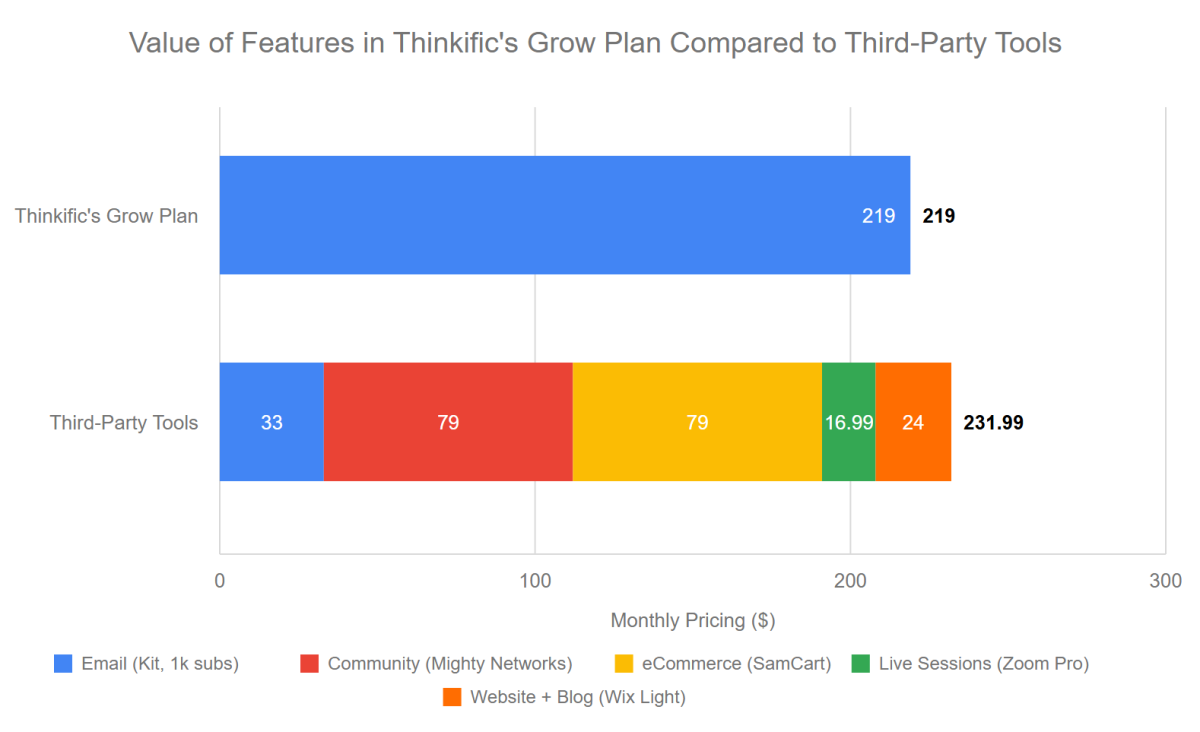
Thinkific has valuable educational tools, but it relies on integrations for marketing.
As you may see from the pricing comparison graph, if you wanted to get the same functionality from third-party tools that you have included in the Thinkific Grow plan, you would have to pay more per month. With Thinkific you have all of these tools included. Plus a course builder.
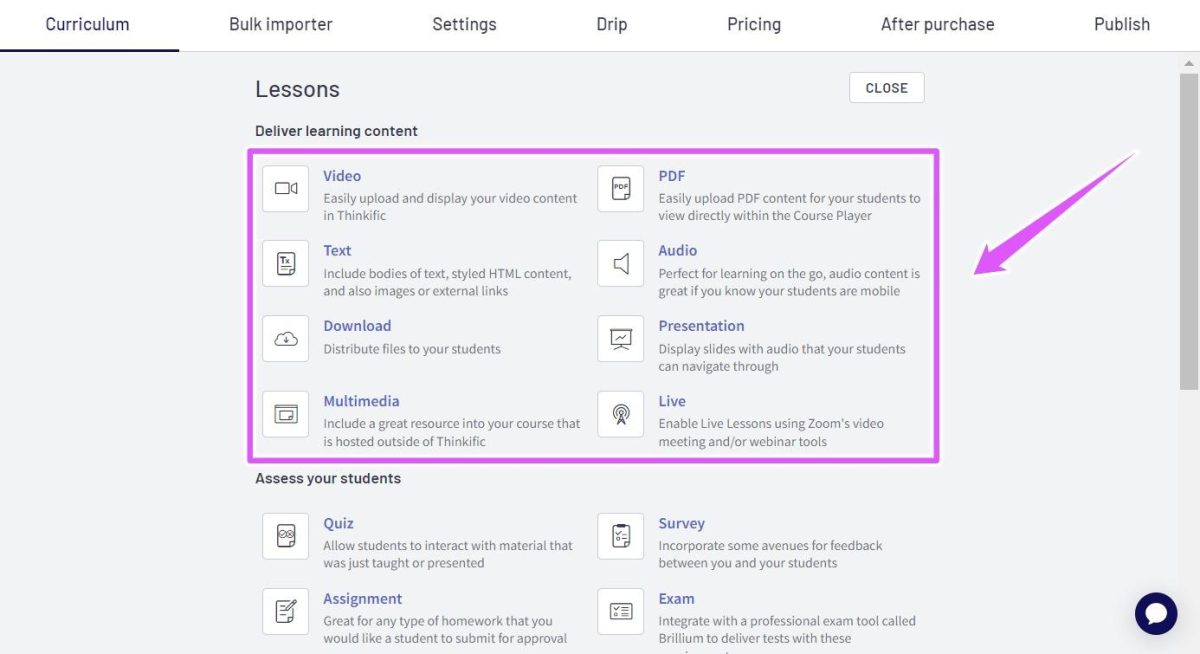
Thinkifc’s highest value is its intuitive course creation process.
Thinkific leads online course platforms with its intuitive drag-and-drop course builder, which allows for various lesson types for the most engaging course content — including assignments & quizzes, live lessons, downloadables, and more.
Thinkific has a few built-in tools but offers a large number of integrations.
Thinkific has an extensive list of integrations on its Thinkific App Store, including:
- Selling & Conversion,
- Email & Marketing,
- Learning Experience,
- Site Design,
- Engagement & Assessment,
- Connections & Social,
- Business Operations.
These integrations give you the flexibility of adding features that are available on competing learning management system platforms. For instance, you can create a learning experience that is similar to the one on Xperiencify (but not as advanced) by using the apps Motrain and Pointagram, which offer gamification features.
Thinkific communities offer valuable quotas, but they’re less advanced than standalone alternatives.
Thinkific offers a community on every plan, starting with one community and five spaces on Basic and rising to three communities with 20 spaces each on Grow.
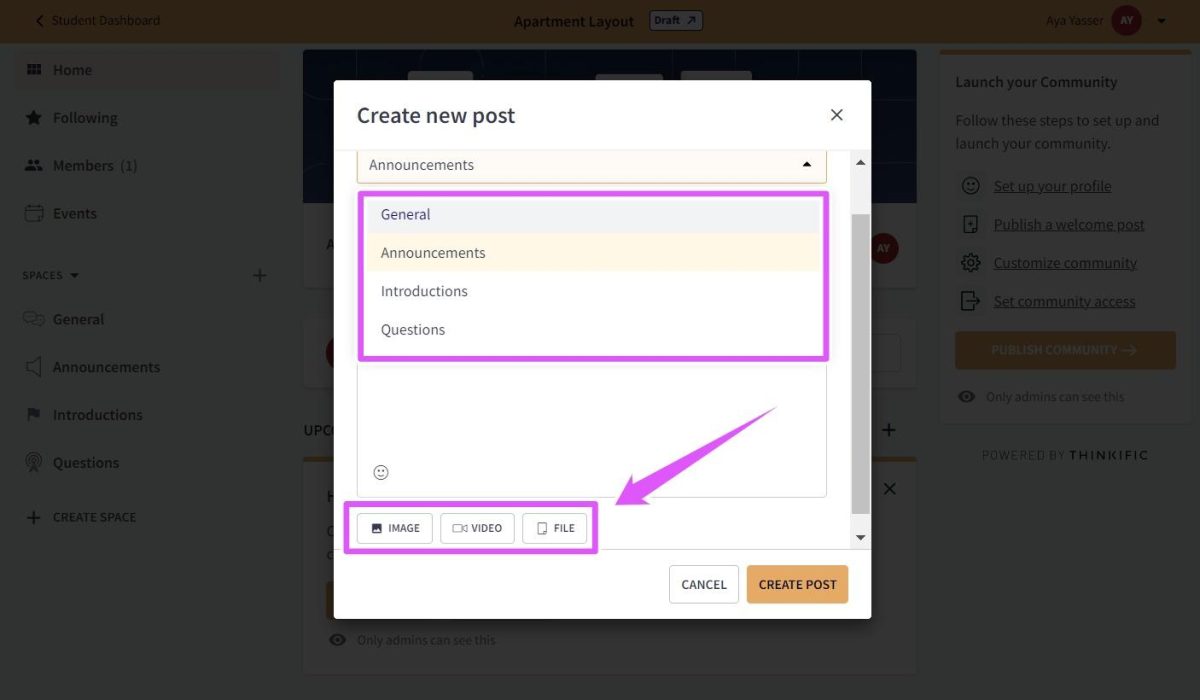
However, Thinkific limits the number of spaces you can have on each plan and its interface isn’t interactive, compared to some standalone community platforms.
For instance, Mighty Networks has a better layout, more engaging post types, and offers an unlimited number of spaces.
The Start Plan is the best value on Thinkific.
Grow packs in the most features short of Plus, but Start is where the jump in capability per dollar is biggest — and it’s the tier Thinkific itself marks as most popular. For $82 a month annually you unlock paid memberships, completion certificates, graded assignments, unlimited live sessions, and the HTML and CSS editor: the tools that actually let you sell and deliver a professional course. Stepping up to Grow only pays off once you specifically need white-labeling, API access, or B2B group orders.
Thinkific Pricing: Other Points To Consider
Thinkific has no transaction fees, but it relies on external tools.
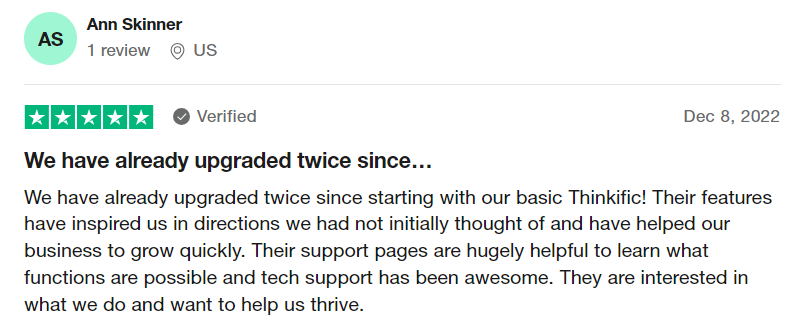
Hidden Costs of Thinkific
There are a few additional costs that you may incur when using Thinkific, including:
- Payment processing fees: Thinkific Payments charges 2.9% per transaction. That’s a card-network pass-through — on paid plans Thinkific itself takes no platform cut.
- Third-party gateway fee: if you use Stripe or PayPal instead of Thinkific Payments and you’re based in the USA, Canada, UK, or EU, Thinkific adds its own fee on top of Stripe’s or PayPal’s rates. It’s waived on Plus, waived above $1,000,000 in annual sales, and doesn’t apply in countries where Thinkific Payments isn’t offered.
- Branded mobile app: $199 per month as an add-on on Basic, Start, and Grow. It’s bundled into some Plus contracts.
- Third-party integrations: Some of the integrations on Thinkific’s App Store are free, while others require a paid subscription or a one-time fee.
- Custom domain: You can use your custom domain starting from the Basic plan, which costs around $10-$15 per year.
Thinkific Pricing vs Competitor Pricing
Thinkific’s starting price is fairly affordable, compared to other course creation platforms but its lower tiers limit community monetization and some course features.
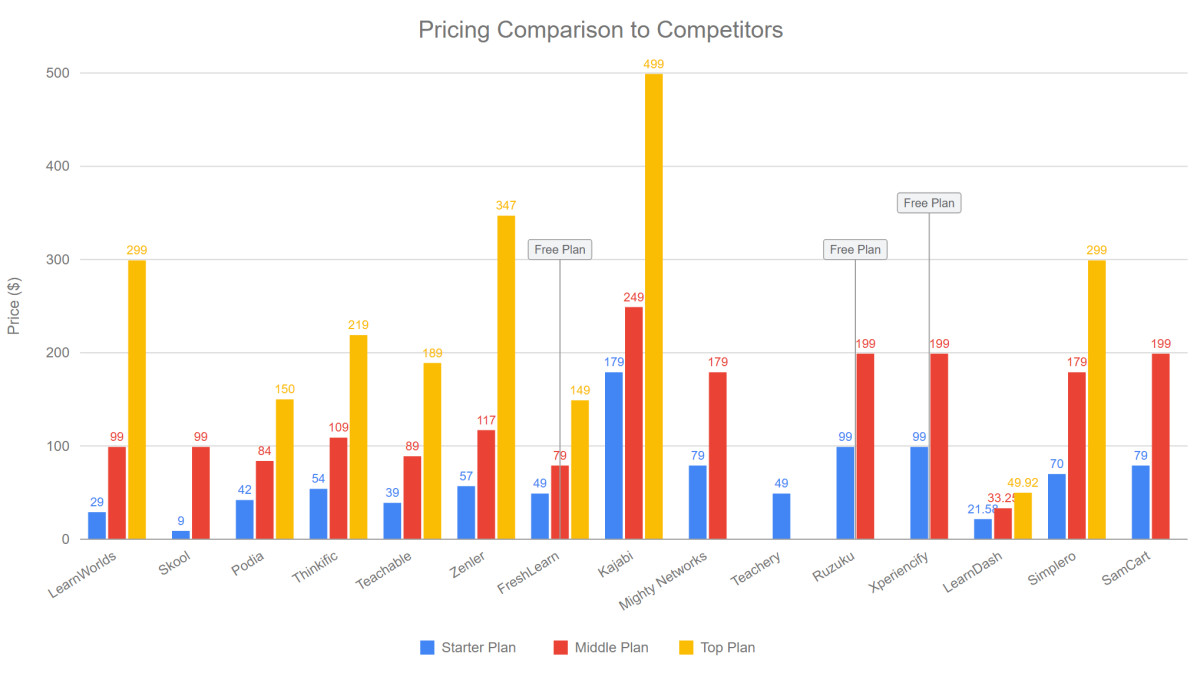
In terms of built-in tools, Thinkific scores less when compared to all-in-one platforms like Kajabi. However, Thinkific offers more integrations for software that might perform even better than built-in tools, since they’re often being developed for that specific use only.
For more insight, check our comparisons Thinkific vs Kajabi, Thinkific vs Mighty Networks, and LearnWorlds vs Thinkific.
Thinkific Alternatives
Here are our suggested alternatives that address common concerns when choosing Thinkific.
| Thinkific Concerns | Suggested Alternatives |
|---|---|
| No free plan | FreshLearn, Ruzuku, Xperiencify |
| Limited community features | Skool, Mighty Networks, Kajabi, LearnWorlds |
| Limited website | Kajabi, LearnWorlds |
| No built-in gamification | Xperiencify, LearnWorlds, Skool |
| No automations | Kajabi, New Zenler |
Thinkific Pricing: Frequently Asked Questions (FAQs)
How do I collect payments on Thinkific?
They have a very unique Thinkific feature for that: TCommerce, a built-in payment processor that charges 2.9% per transaction with no Thinkific platform fee on paid plans. It’s available to creators in the USA, Canada, UK, EU, Switzerland, Norway, Singapore, Hong Kong, Australia, and New Zealand. You can also use Stripe or PayPal, but creators in the USA, Canada, UK, and EU pay an extra third-party gateway fee for doing so.
Do you get an email with Thinkific?
Thinkific includes built-in email automation, so you can capture leads, send transactional messages, and run basic nurture flows without leaving the platform. It isn’t a full email marketing suite, though. Promotional broadcasts and advanced segmentation still need Mailchimp, ActiveCampaign, or a similar tool connected through the App Store or Zapier — and this remains the single most common gap flagged in Thinkific reviews.
Thinkific Pricing: Final Verdict
Thinkific is a well-priced course platform, but it’s best paired with a dedicated email tool.
To sum up, the Thinkific course creation platform provides high value by offering unlimited published courses on every plan and taking no platform cut of your sales.
However, if your business thrives on communities, you can consider platforms that offer membership monetization on their entry-level plans — Thinkific reserves that for Start and above.
Overall, Thinkific is ideal for knowledge providers who want to offer interactive learning experiences and engage with their students on multiple levels. With the free plan retired, the 30-day trial is now the way to test it, and its mid-tier plans still leave enough budget to invest in third-party integrations if you’re not satisfied with the built-in tools on other learning platforms.