



If you’ve tried to decode Tutor LMS’s pricing page (whether the $199/year Individual plan covers your needs, whether you need the $399 Business plan for multiple sites, and what WordPress hosting, OpenAI API fees, and self-hosted maintenance will add on top) you already know that WordPress LMS pricing looks simple until the full cost emerges.
Tutor LMS is a WordPress LMS plugin with over 100,000 active installations, offering a drag-and-drop course builder, built-in eCommerce, and quiz and assessment tools. It gives you full data ownership and takes zero revenue cuts on course sales.
But online education businesses now need marketing, community building, coaching, and sales automation alongside course delivery. Tutor LMS’s plugin-only approach leaves gaps that require additional plugins, integrations, and ongoing maintenance to fill.
We’ve analyzed Tutor LMS’s pricing tiers, included features, and total cost of ownership. It’s the right choice if:
- You already run a WordPress site and want to add course delivery without switching platforms
- You need full data ownership and self-hosted infrastructure
- You’re building a multi-instructor marketplace with commission sharing
- You want lifetime licensing to avoid recurring SaaS fees
- You’re comfortable managing WordPress hosting, updates, and plugin compatibility
However, Tutor LMS is not a good choice if:
- You want one platform that handles courses, marketing, community, and payments together
- You need built-in coaching tools with scheduling and video
- You prefer a managed platform without WordPress hosting overhead
- You want email marketing and sales funnels without separate plugins
- You need a branded mobile app for your students
In this case, consider Kajabi: a creator commerce platform that bundles course creation, coaching, community, email marketing, website building, and payment processing into one managed system. It eliminates the need to assemble and maintain a multi-plugin WordPress stack.
We’ve included a detailed pricing comparison with Kajabi in this review as the stronger option for educators who want everything under one roof. If you want to jump straight to the Kajabi pricing breakdown, use this link.
Tutor LMS Pricing Summary
|
Tutor LMS |
Kajabi | |
|---|---|---|
|
Free Plan |
• Free WordPress plugin • Core course creation • Community-only support • No Pro add-ons |
• No free plan • 30-day money-back guarantee • Full platform access |
|
Entry Plan |
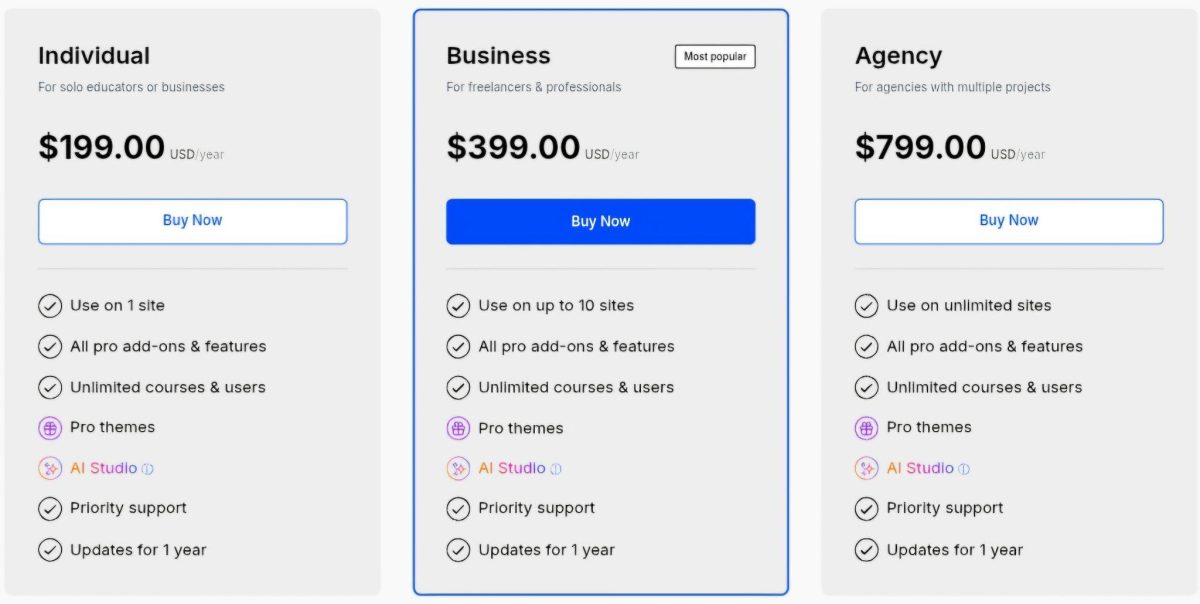
• Individual: $199/year (1 site) • All Pro add-ons included • Unlimited courses/students • Priority support |
• Basic: $143/month (annual) • 5 products, 2,500 contacts • Email marketing, website, checkout • Zero transaction fees |
|
Mid-Tier |
• Business: $399/year (10 sites) • Same features as Individual • Lifetime option: $999 |
• Growth: $199/month (annual) • 50 products, 25,000 contacts • Automations, webhooks • 11 admin users |
|
High-Tier |
• Agency: $799/year (unlimited sites) • Lifetime option: $1,999 • Same features as Business |
• Pro: $399/month (annual) • Unlimited products, 100,000 contacts • Branded mobile app, API access • 26 admin users |
|
Best For |
WordPress site owners who want a self-hosted LMS with full data control and no revenue sharing |
Coaches, course creators, and entrepreneurs who want courses, coaching, community, marketing, and sales tools in one managed platform |
⭐ Build and sell online courses with Tutor LMS using this link. It’s a flexible WordPress LMS platform that makes it easy to create lessons, quizzes, memberships, and student experiences from your own website.
Tutor LMS Pricing: In-Depth Overview
Tutor LMS uses a flat-fee, site-license model with no per-student fees, no per-course limits, and no percentage cut on course revenue.
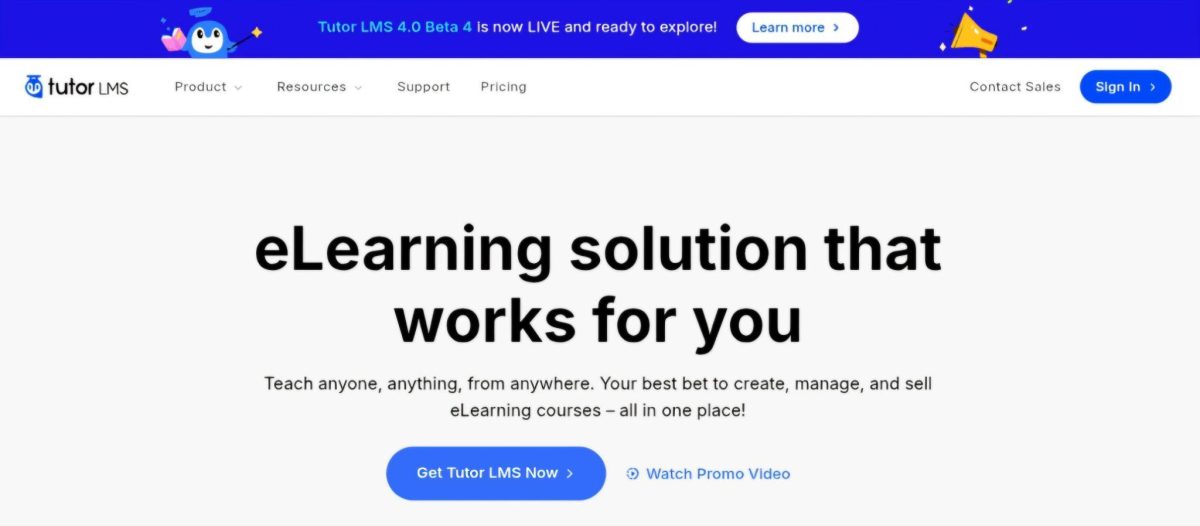
Pricing depends only on how many WordPress sites you activate. All Pro plans share the same feature set, with every add-on bundled. A free version on WordPress.org with limited functionality makes it one of the more accessible entry points for WordPress course creation.
Here’s what each tier includes, and what costs extend beyond the license fee.
Tutor LMS Free Plan: $0 (WordPress.org Plugin)
|
Feature |
Details |
|---|---|
|
Price |
$0 |
|
Courses |
Unlimited |
|
Students |
Unlimited |
|
Quiz Types |
Basic set |
|
Add-ons |
None (Pro-only) |
|
Support |
Community forums only |
The free plugin on WordPress.org provides core course creation with the drag-and-drop builder, basic quiz functionality, and student management.
It excludes all Pro add-ons: Assignments, Gradebook, Content Drip, Certificate Builder, Zoom/Google Meet integration, Reports/Analytics, Subscriptions, Multi-Instructor support, H5P interactive content, and the native eCommerce engine. Free users get community support through WordPress.org forums and the Facebook group only.
|
Free Plan Pros |
Free Plan Cons |
|---|---|
|
✅ Genuinely free forever |
❌ No Pro add-ons (20+ excluded) |
|
✅ Unlimited courses and students |
❌ No native eCommerce |
|
✅ Full drag-and-drop builder |
❌ No certificates or gradebook |
|
✅ Good for evaluating the platform |
❌ Community-only support |
The Bottom Line 👉 The free plan works for testing Tutor LMS’s core builder and interface, but any serious course business needs Pro for monetization, assessments, and analytics.
Tutor LMS Individual Plan: $199/year or $499 Lifetime
|
Feature |
Annual |
Lifetime |
|---|---|---|
|
Price |
$199/year |
$499 one-time |
|
Sites |
1 |
1 |
|
Pro Add-ons |
All 20+ included |
All 20+ included |
|
Courses/Students |
Unlimited |
Unlimited |
|
Support |
Priority |
Priority |
The Individual plan unlocks everything Tutor LMS offers for a single WordPress site.
All 20+ Pro add-ons come included: Subscriptions, Course Bundle, Content Bank, Content Drip, Multi Instructor, Google Meet, Reports/Analytics, Email automation, Calendar, Notifications, Google Classroom, Zoom, Quiz Export/Import, Enrollments, Course Attachments, Course Preview, Prerequisites, Assignments, Gradebook, and H5P.
The lifetime option at $499 removes recurring fees, though “lifetime” refers to the product’s lifetime, not the buyer’s.
|
Individual Plan Pros |
Individual Plan Cons |
|---|---|
|
✅ All features for $199/year |
❌ Limited to 1 WordPress site |
|
✅ Lifetime option eliminates renewals |
❌ WordPress hosting costs extra |
|
✅ No per-student or revenue fees |
❌ AI Studio needs separate OpenAI key |
|
✅ Priority support included |
❌ No marketing or website tools |
The Bottom Line 👉 The Individual plan offers strong value for single-site course creators comfortable with WordPress, but total cost of ownership extends well beyond the license fee.
Tutor LMS Business Plan: $399/year or $999 Lifetime
|
Feature |
Annual |
Lifetime |
|---|---|---|
|
Price |
$399/year |
$999 one-time |
|
Sites |
Up to 10 |
Up to 10 |
|
Pro Add-ons |
All 20+ included |
All 20+ included |
|
Courses/Students |
Unlimited |
Unlimited |
|
Support |
Priority |
Priority |
The Business plan doubles the price and adds 9 more site licenses. It targets freelancers and small agencies building LMS sites for clients. Every feature stays identical to the Individual plan.
At $399/year for 10 sites, the per-site cost drops to roughly $40/year, making it cost-effective for agencies with multiple client projects.
|
Business Plan Pros |
Business Plan Cons |
|---|---|
|
✅ 10 sites at $40/year each |
❌ Still requires hosting per site |
|
✅ Same full feature set |
❌ No centralized management dashboard |
|
✅ Lifetime option available |
❌ Plugin maintenance across 10 sites |
|
✅ Client billing flexibility |
❌ Each site needs independent setup |
The Bottom Line 👉 Business makes sense for agencies managing multiple client LMS projects on WordPress, but the hidden cost is managing WordPress infrastructure across all 10 sites.
Tutor LMS Agency Plan: $799/year or $1,999 Lifetime
|
Feature |
Annual |
Lifetime |
|---|---|---|
|
Price |
$799/year |
$1,999 one-time |
|
Sites |
Unlimited (annual) / 50 (lifetime) |
50 |
|
Pro Add-ons |
All 20+ included |
All 20+ included |
|
Courses/Students |
Unlimited |
Unlimited |
|
Support |
Priority |
Priority |
The Agency plan provides the most site coverage.
The annual plan allows unlimited site activations, while the lifetime option caps at 50 sites, a distinction that matters for large agencies. Features stay identical across all tiers.
|
Agency Plan Pros |
Agency Plan Cons |
|---|---|
|
✅ Unlimited sites (annual) |
❌ Lifetime caps at 50 sites |
|
✅ Lowest per-site cost |
❌ $1,999 upfront for lifetime |
|
✅ Complete feature parity |
❌ Managing many WordPress installs |
|
✅ 30% nonprofit discount available |
❌ Support is ticket-based, not live |
The Bottom Line 👉 Agency pricing rewards scale, but the operational cost of managing dozens of WordPress LMS installations can dwarf the license savings.
Tutor LMS Hidden and Additional Costs
Beyond the license fee, Tutor LMS’s true cost of ownership includes several layers:
WordPress Hosting:
- Required for every site, not included in any Tutor LMS plan
- Quality WordPress hosting typically runs $10–$50/month for a single site
- Performance-optimized hosting (Cloudways, Kinsta, WP Engine) costs more for LMS workloads with video and concurrent users
OpenAI API Costs:
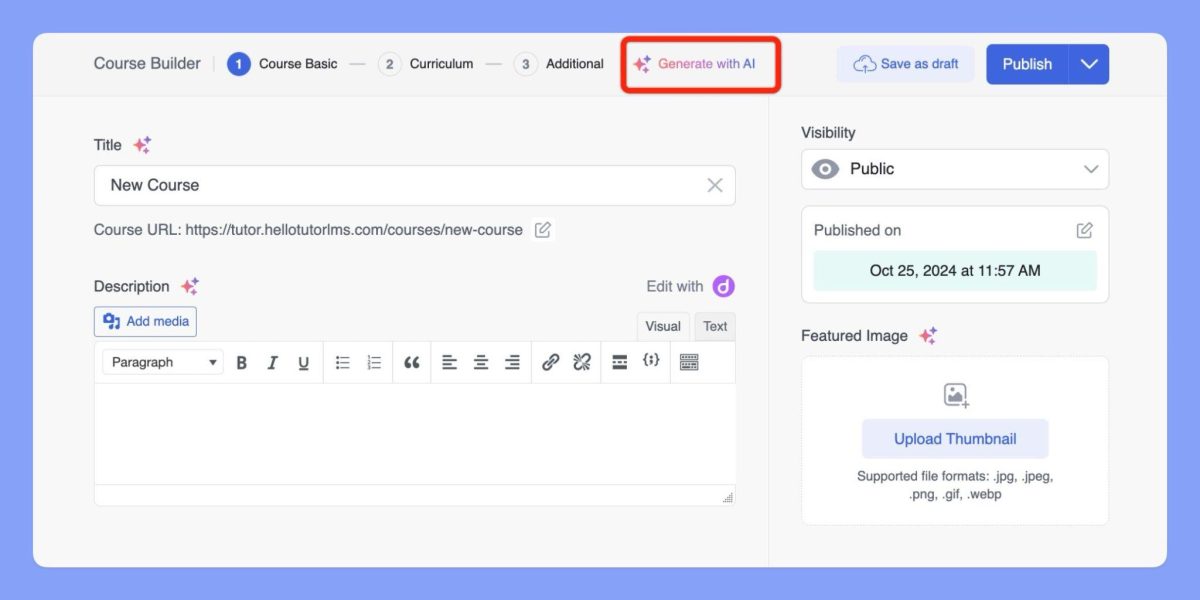
- AI Studio requires a user-supplied OpenAI API key with paid credits
- Usage-based billing from OpenAI adds an ongoing variable cost not reflected in the headline price
Source: Tutor LMS
Payment Processing Fees:
- Stripe, PayPal, and other gateway fees apply at standard rates (typically 2.9% + $0.30)
- Tutor LMS takes no cut, but processor fees still apply
Third-Party Plugin Costs:
- Email marketing requires FluentCRM, Groundhogg, or another plugin
- Community features require BuddyPress, BuddyBoss, or PeepSo
- Advanced automation requires Uncanny Automator or AutomatorWP
- Landing pages and funnels require a separate page builder or plugin
- Each adds licensing fees and maintenance overhead
Maintenance Overhead:
- WordPress core updates, plugin compatibility testing, security patching, and backups fall on the site owner
- Tutor LMS releases 3.9.7, 3.9.8, and 3.9.9 each patched SQL injection vulnerabilities, underscoring the need for timely updates
Where Tutor LMS Falls Short
While Tutor LMS delivers strong course creation for WordPress users, its plugin-based architecture creates gaps for creators who need a complete business platform:
No Built-In Marketing or Sales Tools
- No native email marketing, landing page builder, or sales funnel system
- Creators must add FluentCRM or another email plugin, a page builder for landing pages, and a separate funnel tool
- Each additional plugin adds cost, complexity, and potential compatibility issues
No Native Coaching or Scheduling
- No built-in 1:1 or group coaching product with scheduling and video
- Zoom and Google Meet integrations handle live classes but not structured coaching programs with client management
- Creators offering coaching alongside courses need separate tools
No Branded Mobile App
- Tutor LMS is mobile-responsive but offers no white-label iOS or Android app
- Students access courses through a mobile browser, not a dedicated app under the creator’s brand
- This limits retention and credibility compared to platforms with native app support
WordPress Infrastructure Burden
- Site owners handle hosting, security, backups, updates, and plugin compatibility
- Consecutive SQL injection patches in three releases mean delayed updates carry real security risk
- Performance optimization for video-heavy courses requires hosting expertise
Support Limited to Business Hours
- Priority support operates 10am–6pm Monday through Friday (UTC+6), an 8-hour weekday window
- No weekend coverage and no guaranteed response time SLA
- Some users report that support requires sharing WordPress admin access, raising security concerns
These limitations have led many course creators to explore platforms that consolidate their entire business into one managed system…
Best Tutor LMS Alternative – Kajabi
Kajabi replaces the multi-plugin WordPress stack with a single platform covering courses, coaching, community, email marketing, website, and payments, all from one dashboard.
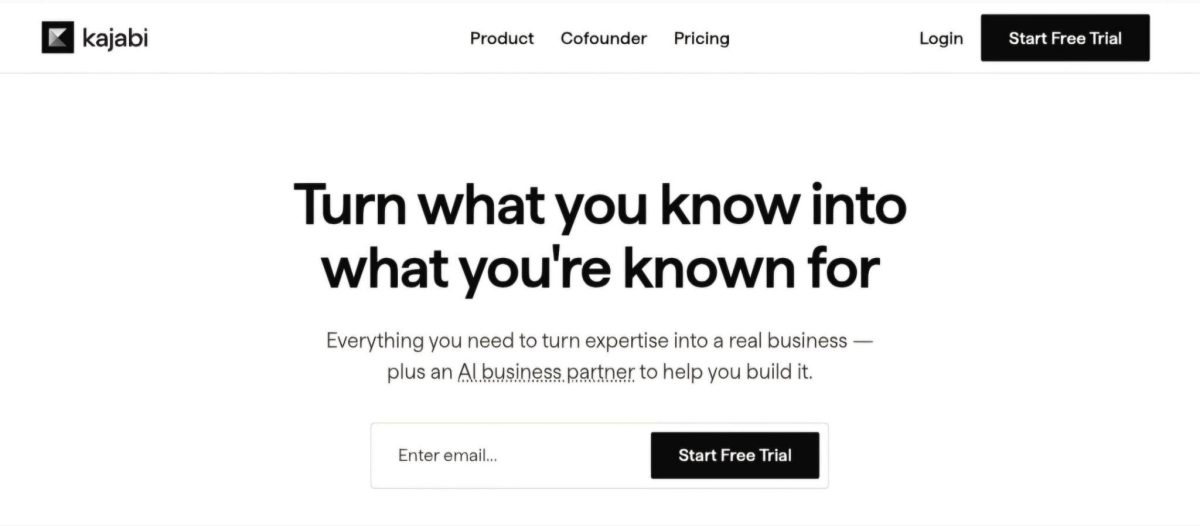
For creators who find Tutor LMS’s WordPress dependency, missing marketing tools, and ongoing maintenance burdensome, Kajabi takes a different approach: everything a knowledge business needs in one login, with no plugins to manage, no hosting to configure, and no security patches to apply.
Founded in 2010, Kajabi has powered over $10 billion in creator earnings across 100,000+ businesses. It serves coaches, course creators, and entrepreneurs who want to focus on growing revenue rather than managing a technology stack.
Its Cofounder AI reads the creator’s actual business data to provide guidance on products, pricing, and marketing. Creator Studio converts a single piece of long-form content into 40+ assets (emails, blog posts, social captions, short videos), streamlining content repurposing alongside product sales.
Kajabi works well for entrepreneurs selling courses alongside coaching, communities, and digital downloads; for businesses that need email marketing and sales funnels without bolting on separate tools; and for operators who prefer a predictable monthly cost to managing WordPress infrastructure.
⭐ Get instant access to Kajabi with an extended 30-day free trial — double the standard trial length. Build your website, courses, funnels, and email marketing risk-free with this exclusive offer.
Kajabi Basic Plan: $143/month (annual) or $179/month
|
Feature |
Details |
|---|---|
|
Products |
5 |
|
Contacts |
2,500 |
|
Websites |
1 |
|
Communities |
1 |
|
Admin Users |
2 |
|
Marketing Emails |
Unlimited |
Kajabi’s Basic plan puts the full platform at a single monthly price. Unlike Tutor LMS, where marketing, community, and payments require separate plugins, Kajabi includes email marketing, landing pages, funnels, automations, webhooks, checkout pages, affiliate programs, and a Universal Inbox from the start.
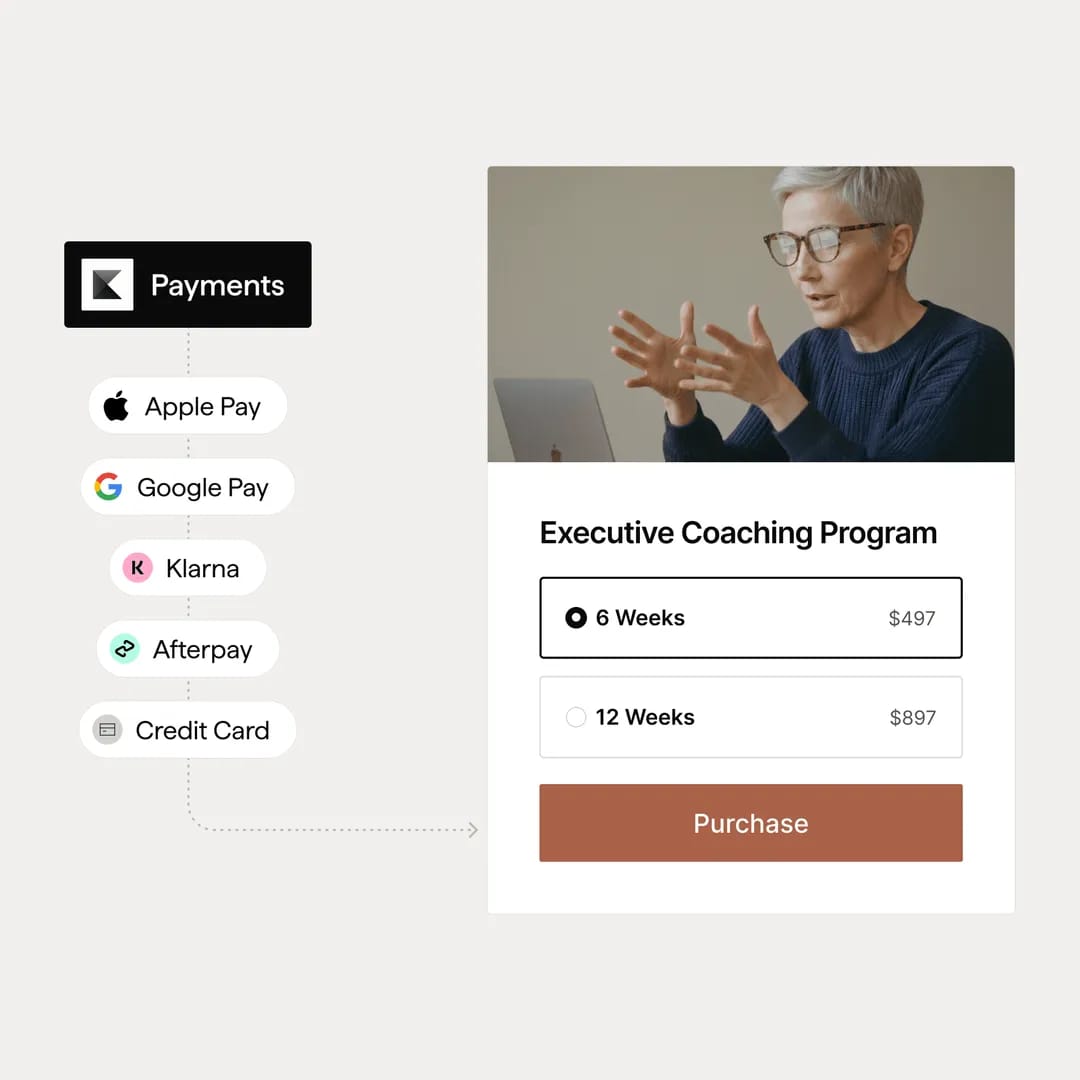
All plans include zero transaction fees on course sales, and Kajabi Payments supports 140+ currencies with Apple Pay, Google Pay, Afterpay, and Klarna at checkout.
|
Basic Plan Pros |
Basic Plan Cons |
|---|---|
|
✅ Full business platform in one |
❌ $143/month vs. assembling separate tools |
|
✅ Zero transaction fees |
❌ Limited to 5 products |
|
✅ Unlimited emails and landing pages |
❌ 2,500 contact ceiling |
|
✅ No hosting or maintenance overhead |
❌ No branded mobile app |
The Bottom Line 👉 Basic suits coaches and entrepreneurs ready to consolidate their business tools (email, website, courses, payments) into one platform, replacing multiple subscriptions with a single monthly cost.
Kajabi Growth Plan: $199/month (annual) or $249/month
|
Feature |
Details |
|---|---|
|
Products |
50 |
|
Contacts |
25,000 |
|
Websites |
1 |
|
Communities |
1 |
|
Admin Users |
11 |
|
Additional Features |
All Basic features included |
Growth gives established businesses room with 50 products and 25,000 contacts.
The plan includes the affiliate program for recruiting partners, 11 admin users for teams, and the automations and webhooks needed for marketing workflows. AI-powered video transcriptions, translations, and dubbed voiceovers in 70+ languages are available at this tier.
|
Growth Plan Pros |
Growth Plan Cons |
|---|---|
|
✅ 50 products for full academies |
❌ $199/month, though it replaces multiple subscriptions |
|
✅ 25,000 contacts for growing lists |
❌ Still 1 website |
|
✅ Affiliate program included |
❌ No branded mobile app |
|
✅ 11 admin users for teams |
❌ No API access |
The Bottom Line 👉 Growth fits entrepreneurs running multiple courses, coaching programs, and communities who need marketing automation to scale.
Kajabi Pro Plan: $399/month (annual) or $499/month
|
Feature |
Details |
|---|---|
|
Products |
Unlimited |
|
Contacts |
100,000 |
|
Websites |
3 |
|
Communities |
3 |
|
Admin Users |
26 |
|
Exclusive Features |
Branded mobile app, API access, custom code editor |
Pro removes the caps and adds the branded mobile app (a white-label iOS/Android app under the creator’s own name in the App Store), API access, and the custom code editor.
With 3 websites and 3 communities, it supports agencies or businesses running multiple brands from one account.
|
Pro Plan Pros |
Pro Plan Cons |
|---|---|
|
✅ Unlimited products |
❌ $399/month is premium-tier pricing |
|
✅ Branded mobile app included |
❌ More capacity than most solo operators need |
|
✅ API access for custom integrations |
❌ Annual commitment for best rates |
|
✅ 3 websites and communities |
❌ Contact-based scaling past 100K |
The Bottom Line 👉 Pro makes sense for established businesses and agencies that need the branded app, unlimited products, and flexibility.
⭐ If you’ve been thinking about starting your online business, this is your sign. Get 30 days of Kajabi free instead of the usual 14 days when you use this special link — no pressure, no rush, just more time to grow.
Tutor LMS Feature Value Breakdown (vs Kajabi)
Total Cost of Ownership
Tutor LMS’s Approach: Tutor LMS’s headline pricing is hard to beat: $199/year for a single site with unlimited courses, unlimited students, and all Pro add-ons. But the actual cost extends beyond the license.
WordPress hosting runs $10–$50/month. Email marketing requires a separate plugin (FluentCRM from $129/year, or a hosted ESP). Landing pages need a page builder. Community features need BuddyPress or BuddyBoss. A realistic single-site stack often runs $50–$150/month when you factor in hosting, email, and essential plugins, plus the time cost of managing it all.
Kajabi’s Approach: Kajabi’s $143/month Basic plan includes hosting, email marketing, landing pages, funnels, community, website, checkout, and support in one bill. No hosting to manage, no plugins to update, no compatibility issues to troubleshoot.
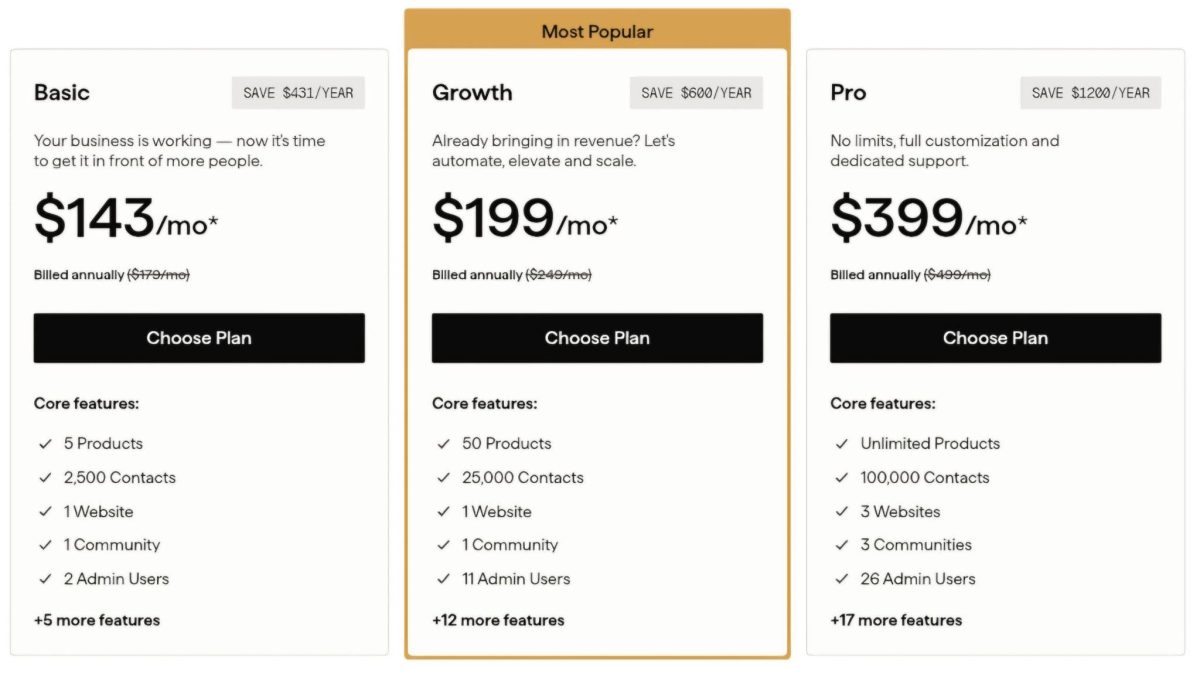
The monthly cost looks higher, but the gap narrows when you account for the full WordPress stack. Replicating Kajabi’s feature set requires separate subscriptions for course hosting, email marketing, a funnel builder, and a community tool, each with its own cost, login, and data silo.
Kajabi charges 0% platform transaction fees on all plans, so none of your revenue goes back to the platform beyond the subscription.
🪙 Value Verdict: Tutor LMS costs less if you already have WordPress infrastructure and only need course delivery. Kajabi costs less in total when you need marketing, community, and sales tools alongside courses.
The consolidated analytics (where you can see how email campaigns connect to course enrollments and revenue in one dashboard) provide insights that are hard to replicate when data lives across separate platforms.
Course Creation and Assessment
Tutor LMS’s Approach: Tutor LMS’s course builder is designed for structured learning. It supports eight quiz question types (True/False, Multiple Choice, Open Ended/Essay, Fill in the Blanks, Short Answer, Matching, Image Answering, Ordering), graded assignments with file uploads, H5P interactive content, and a Gradebook that auto-calculates letter grades from configurable scales.
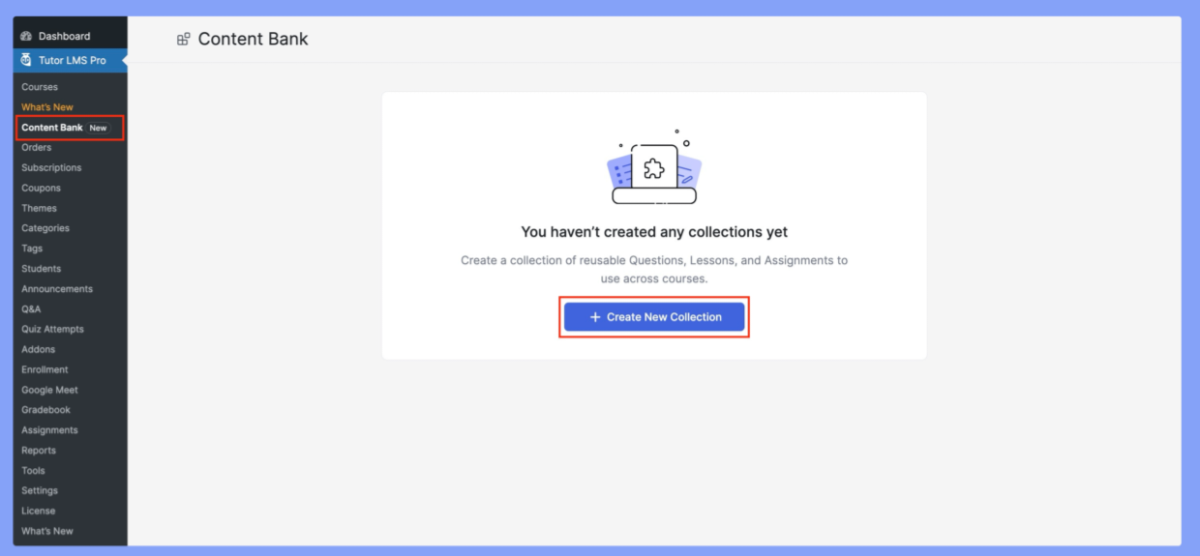
The Content Bank lets instructors reuse lessons and quiz questions across courses. Version 4.0 adds more assessment types including Draw Image, Pin Image, and Puzzle formats.
Source: Tutor LMS
Kajabi’s Approach: Kajabi’s course tools focus on content delivery and engagement over assessment depth. Courses support modules, lessons, quizzes, drip scheduling, content locking, paywalls, completion certificates, and cohort-based formats with live video sessions.
Source: Kajabi
The AI Course Generator scaffolds outlines from prompts, and video transcriptions with dubbing in 70+ languages reach global audiences. Quiz options are more limited, though, and there’s no equivalent to Tutor LMS’s Gradebook or H5P support.
🪙 Value Verdict: Tutor LMS offers deeper assessment and grading tools for formal education. Kajabi provides a cleaner content delivery experience for courses and coaching programs where engagement matters more than grading.
Marketing and Sales Infrastructure
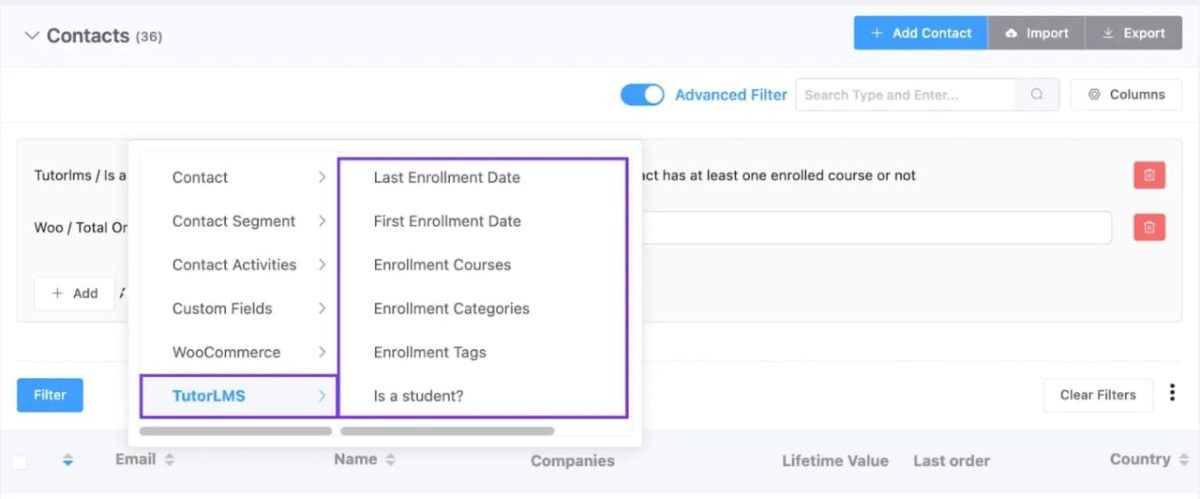
Tutor LMS’s Approach: Tutor LMS handles course delivery and payments but not marketing. There’s no built-in email system, no landing page builder, no sales funnel tool, and no affiliate program.
Creators must integrate FluentCRM or another email tool, use a page builder for marketing pages, and add automation plugins like Uncanny Automator to connect the pieces. Each integration adds cost and maintenance.
Source: Tutor LMS
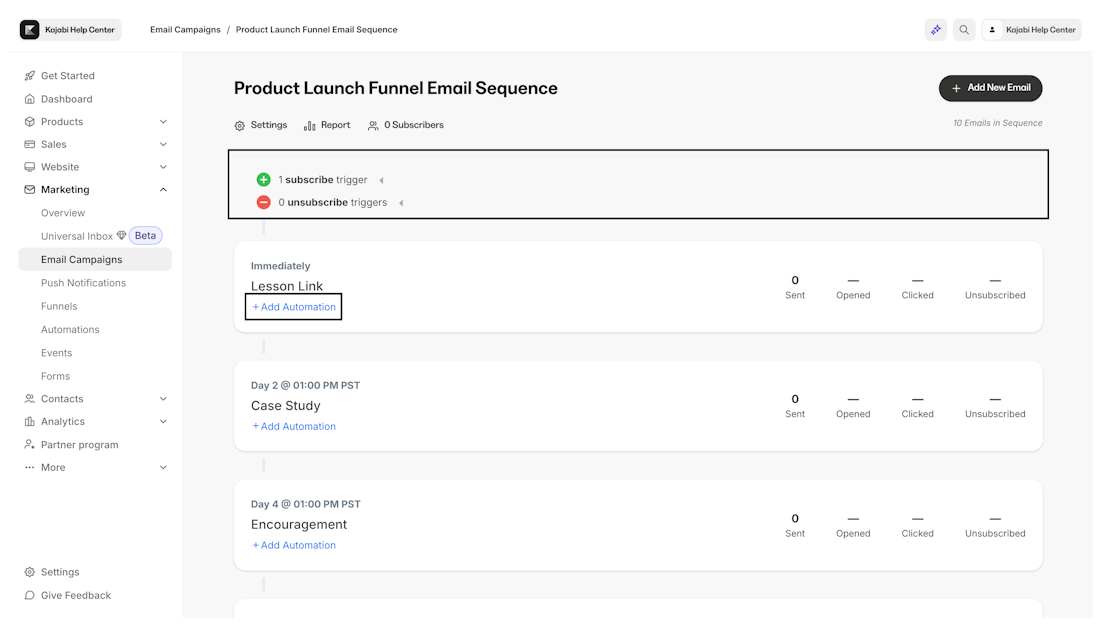
Kajabi’s Approach: Kajabi includes the full marketing stack natively. Unlimited funnels, landing pages, and marketing emails come with all plans. The automation system supports “when/then/only if” logic across email campaigns, funnels, offers, course lessons, quizzes, and certificates. A/B testing, resend-to-unopened, countdown timers, and liquid personalization are built into the email editor.
Source: Kajabi
The affiliate program (available on Growth and Pro) includes tracked share links, coupon-code tracking, and automated PayPal payouts. Creator Studio converts a single piece of long-form content into 40+ assets (emails, blog posts, social captions, short videos), streamlining content marketing alongside product sales.
Consolidated analytics across these tools (showing which email campaigns drive enrollments, which funnels convert, and how community engagement correlates with revenue) provide insights that are hard to replicate when data lives across separate platforms.
🪙 Value Verdict: Kajabi provides a marketing infrastructure that Tutor LMS cannot match without multiple third-party plugins. For creators who need to attract, nurture, and convert an audience, this gap matters.
Community and Coaching
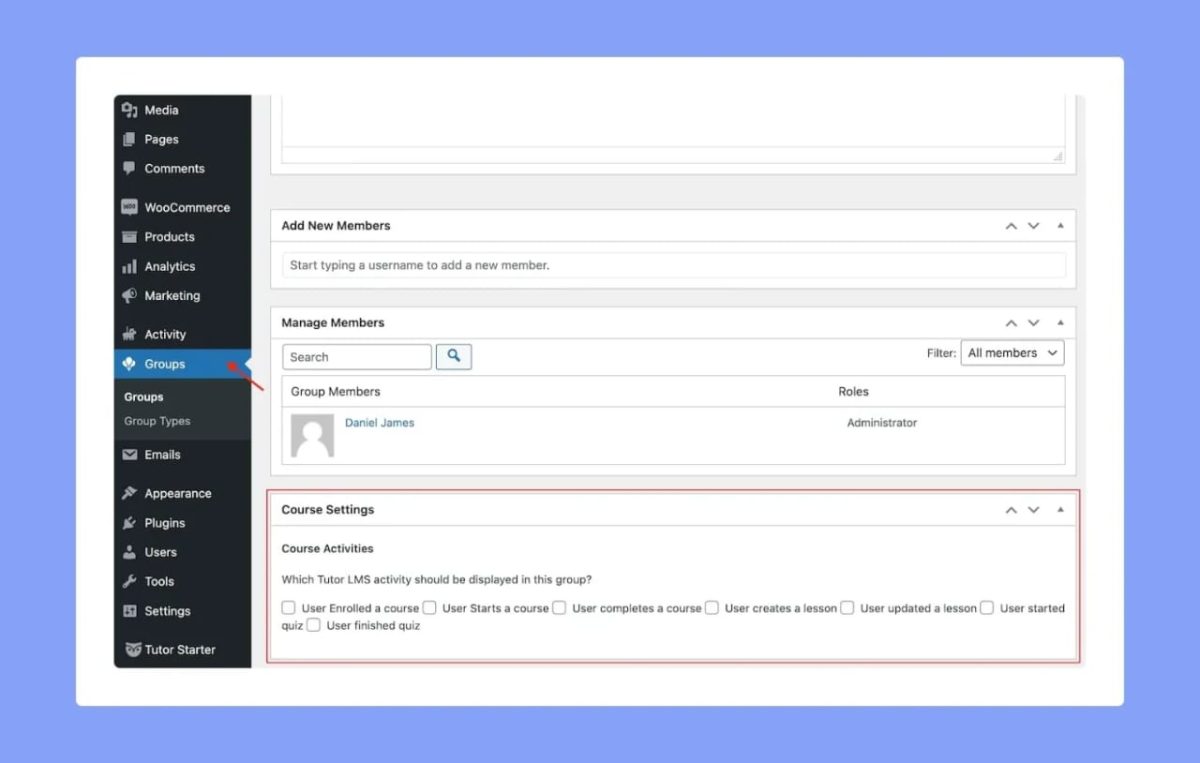
Tutor LMS’s Approach: Tutor LMS has no native community or coaching features. Community requires BuddyPress, BuddyBoss, or PeepSo integration. Coaching requires external scheduling and video tools.
Source: Tutor LMS
While Zoom and Google Meet integrations handle live classes within the course structure, they don’t provide the client management, session notes, or structured coaching workflows that dedicated coaching tools offer.
Kajabi’s Approach: Kajabi includes a native community product with channels, live rooms, challenges, gamification with leaderboards, polls, direct messaging, and moderation tools.
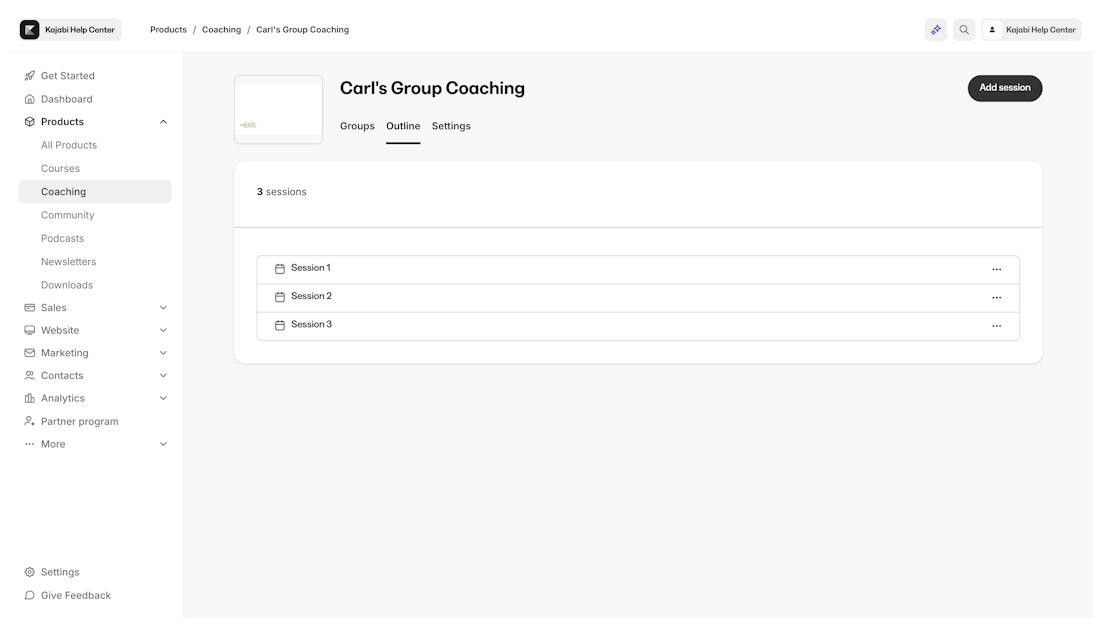
The coaching product provides 1:1 and group coaching with scheduling, built-in live video with breakout rooms, session recording auto-upload, and shared notes. Both products sit alongside courses in the same member portal.
Source: Kajabi
🪙 Value Verdict: Kajabi includes community and coaching as native product types. Tutor LMS requires separate plugins for each, resulting in a fragmented experience and higher complexity.
Platform Maintenance and Reliability
Tutor LMS’s Approach: As a self-hosted WordPress plugin, all infrastructure falls on the site owner: hosting, SSL, backups, performance optimization, WordPress core updates, and plugin compatibility testing. Three consecutive releases (3.9.7, 3.9.8, 3.9.9) each patched SQL injection vulnerabilities.
That shows active maintenance, but it also means self-hosted operators must apply updates promptly or face security exposure.
Kajabi’s Approach: Kajabi manages all infrastructure: hosting, security, backups, updates, and uptime. A public status page at status.kajabi.com tracks system availability. Creators never deal with plugin conflicts, server optimization, or security patches. The tradeoff is less control over the underlying infrastructure.
🪙 Value Verdict: Kajabi eliminates infrastructure burden entirely. Tutor LMS gives full control but requires ongoing technical investment. The right choice depends on whether you value control or convenience.
Final Verdict: Tutor LMS vs Kajabi
The choice between Tutor LMS and Kajabi depends on what you’re building and how much of your technology stack you want to manage yourself:
👍 Tutor LMS is a WordPress LMS plugin for educators who want full data ownership, deep assessment tools, and no revenue sharing on course sales. Annual pricing runs $199 to $799 based on site count (with lifetime options from $499 to $1,999).
It lets WordPress site owners build course platforms with 11 built-in payment gateways, multi-instructor marketplaces with commission sharing, and quiz types including H5P interactive content.
This self-hosted model works best for WordPress-proficient educators who value data control, agencies building LMS sites for clients, multi-instructor training organizations, and course creators whose budget prioritizes low licensing costs over operational simplicity.
Get started with Tutor LMS here.
👉 Kajabi is a creator commerce platform built on the principle that running a knowledge business shouldn’t require managing a technology stack.
It bundles courses, coaching, community, email marketing, website building, and payment processing into one managed system from $143 to $399/month with 0% platform transaction fees, eliminating the plugin sprawl, hosting management, and integration maintenance that WordPress-based solutions demand.
This consolidated approach makes it the stronger choice for entrepreneurs and small teams building businesses around courses, coaching, and community; for operators who need marketing automation and sales funnels in their platform; and for anyone who would rather create content than maintain infrastructure.
Get started with a 30-day free trial with Kajabi here.
The fundamental difference isn’t price. It’s architecture. Tutor LMS asks “How can we give educators full control over their learning platform?” Kajabi asks “How can we let experts run their entire business from one place?”
Tutor LMS Pricing FAQ
Is Tutor LMS free to use?
Tutor LMS offers a permanently free plugin on WordPress.org with core course creation features, unlimited courses, and unlimited students. However, the free version excludes all 20+ Pro add-ons including Assignments, Gradebook, Certificate Builder, Content Drip, native eCommerce, Zoom integration, and Reports. Most serious course businesses need the Pro version starting at $199/year.
How much does Tutor LMS really cost?
The license starts at $199/year, but total cost includes WordPress hosting ($10–$50/month), payment processing fees from Stripe or PayPal, and optional costs for email marketing plugins, community plugins, page builders, and the OpenAI API key needed for AI Studio. A realistic single-site setup often runs $50–$150/month when all components are factored in.
Does Tutor LMS take a cut of course sales?
No. Tutor LMS charges zero revenue share on course sales across all plans. The only transaction costs come from payment processors like Stripe or PayPal at their standard rates (typically 2.9% + $0.30 per transaction). This is consistent across the free plugin and all Pro tiers.
What’s included in Tutor LMS’s lifetime plan?
Lifetime plans include the same features as annual plans (all Pro add-ons, unlimited courses and students, priority support) with a one-time payment: $499 for 1 site, $999 for 10 sites, or $1,999 for 50 sites. The term “lifetime” refers to the product’s lifetime, not the buyer’s, per the terms and conditions. Lifetime plans also receive updates for the product’s duration.
Can I migrate to Tutor LMS from another WordPress LMS?
Yes. Tutor LMS provides a free one-click migration tool that transfers courses, quizzes, order data, and student data from LearnDash, LearnPress, and LifterLMS. This covers the major WordPress LMS competitors and reduces switching friction.
Does Tutor LMS include email marketing?
No. Tutor LMS includes 50+ email notification triggers for events like enrollment, quiz completion, and subscription changes, but it has no built-in email marketing system for broadcasts, sequences, or campaigns. Creators need to integrate a separate tool like FluentCRM, Groundhogg, or a third-party ESP, adding both cost and setup complexity.
How does Tutor LMS compare to Kajabi for pricing?
Tutor LMS is cheaper on paper: $199/year vs. Kajabi’s $143/month. But Tutor LMS covers only course delivery, while Kajabi includes email marketing, website, community, coaching, checkout, and 0% platform transaction fees.
When you add hosting, email plugins, community plugins, and page builders to a Tutor LMS setup, the gap narrows. Assembling equivalent standalone tools (email platform, funnel builder, community software, course host) can approach or exceed Kajabi’s monthly cost. The right comparison depends on how many tools you’d need to replicate Kajabi’s feature set on WordPress.
Does Tutor LMS offer a branded mobile app?
No. Tutor LMS courses are mobile-responsive and accessible through mobile browsers, but the platform does not offer a white-label native mobile app for iOS or Android. Kajabi’s Pro plan includes a branded mobile app published under the creator’s own name in the App Store and Google Play.