



If you’ve compared MasterStudy LMS’s $149/year single-site license against monthly hosted course platforms, only to realize you still need WordPress hosting, a payment processor, an email marketing tool, and a community platform on top, you know that “affordable” LMS pricing gets complicated once you total the full stack.
MasterStudy LMS serves over 25,000 e-learning professionals in the WordPress ecosystem with features that rival platforms charging ten times more. The plugin offers a free tier with core course-building tools, and paid plans that bundle all 31 premium add-ons at every tier. But because MasterStudy is a WordPress plugin rather than a complete business platform, the true cost of running your course business depends on what you layer around it.
We’ve analyzed MasterStudy LMS’s pricing tiers, included features, and total cost of ownership. It’s the right choice if:
- You already run a WordPress site and want to add course delivery without switching platforms
- You need full control over your data, hosting, and code customization
- You’re building a multi-instructor marketplace where teachers publish and sell independently
- Your budget is limited and you can handle WordPress maintenance yourself
- You need SCORM import for existing corporate training content
However, MasterStudy’s pricing is not a good choice if:
- You want one platform that handles courses, email marketing, sales funnels, and community
- You prefer a hosted solution without managing WordPress updates, security, and hosting
- You need native coaching tools with scheduling and live video
- You want zero transaction fees with integrated payment processing
- You’d rather pay one monthly fee than assemble a tech stack piece by piece
In this case, consider Kajabi: a platform that combines course hosting, coaching, community, email marketing, website building, and sales tools in a single subscription, eliminating the need to stitch together separate WordPress plugins and services.
We’ve included a detailed pricing comparison with Kajabi in this review. If you’re eager to jump into the Kajabi pricing breakdown, go ahead and do so with this link.
MasterStudy LMS Pricing Summary
|
MasterStudy LMS |
Kajabi | |
|---|---|---|
|
Free Plan |
• $0 forever • Core course builder • Quizzes (8 types) • PayPal/Stripe payments • Community support only |
• No free plan • Free trial available • 30-day money-back guarantee |
|
Entry Plan |
• Single Site: $149/year • All 31 add-ons • 1 WordPress site • Priority ticket support |
• Basic: $143/month (annual) • 5 products, 2,500 contacts • Website, email, community included • 24/7 support |
|
Mid-Tier |
• 10 Sites: $299/year • Same features as Single • 10 WordPress sites • Priority ticket support |
• Growth: $199/month (annual) • 50 products, 25,000 contacts • Affiliate program, webhooks • 11 admin users |
|
High-Tier |
• Unlimited: $599/year • Same features • Unlimited sites • Priority ticket support |
• Pro: $399/month (annual) • Unlimited products, 100,000 contacts • Branded mobile app, API access • 26 admin users |
|
Best For |
WordPress users who want an affordable LMS with full data ownership and code-level customization |
Coaches, course creators, and entrepreneurs who want one platform for courses, coaching, community, email marketing, and sales |
MasterStudy LMS Pricing: In-Depth Overview
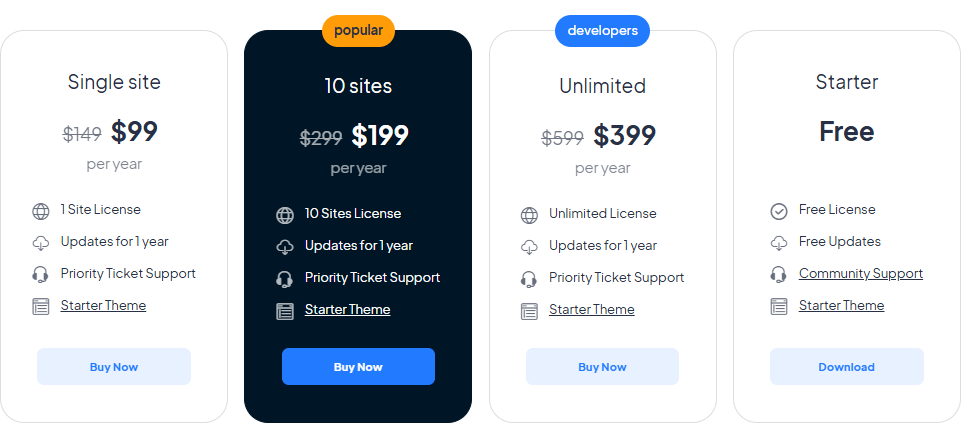
MasterStudy LMS uses a flat-fee, per-site annual licensing model with no per-student or per-course charges.
The structure is simple: a permanently free version covers core functionality, and all three paid tiers include identical features. The only difference is how many WordPress sites you can activate the license on. Beyond the license fee, total cost includes WordPress hosting, payment processor fees, and any third-party tools you add for email marketing or community.
Here’s each tier.
MasterStudy LMS Starter (Free): $0 Forever
|
Feature |
Details |
|---|---|
|
Price |
$0 |
|
Site Licenses |
Unlimited (personal use) |
|
Course Builder |
Full drag-and-drop |
|
Quizzes |
8 question types |
|
Payments |
PayPal, Stripe, bank transfer |
|
Support |
Community (Facebook group, WordPress.org forums) |
The free Starter version provides a usable LMS. You get the core course builder with text and video lessons, quizzes with 8 question types, a basic membership system, payment processing through PayPal and Stripe, and WPML multilingual support.
For a solo instructor testing the waters, this covers the fundamentals without spending anything beyond hosting costs.
|
Starter (Free) Pros |
Starter (Free) Cons |
|---|---|
|
✅ No time limit or feature expiration |
❌ No premium add-ons (certificates, drip, Zoom) |
|
✅ Full course builder included |
❌ Community support only |
|
✅ Accepts payments natively |
❌ No AI course generation |
|
✅ WPML multilingual ready |
❌ No SCORM import |
The Bottom Line 👉 The free tier works for launching a first course, but instructors who need certificates, live classes, or drip content will quickly need the paid version.
MasterStudy LMS Single Site: $149/year
|
Feature |
Details |
|---|---|
|
Price | |
|
Site Licenses |
1 WordPress site |
|
Add-ons Included |
All 31 premium add-ons |
|
Support |
Priority ticket support |
|
Updates |
1 year included |
The Single Site plan unlocks the complete MasterStudy feature set for $149/year.
This includes all 31 premium add-ons: AI Lab for course generation, Zoom and Google Meet live classes, SCORM import, certificate builder with QR verification, drip content scheduling, group courses for B2B, subscriptions and memberships, WooCommerce integration (75+ payment gateways), and more.
At roughly $12.40/month, it costs far less than hosted LMS platforms.
|
Single Site Pros |
Single Site Cons |
|---|---|
|
✅ All 31 add-ons for $149/year |
❌ Single site only |
|
✅ No per-student pricing |
❌ WordPress hosting costs extra |
|
✅ SCORM, Zoom, certificates included |
❌ Renewal required for updates/support |
|
✅ AI course generation via AI Lab |
❌ OpenAI API costs separate for AI features |
The Bottom Line 👉 The Single Site plan delivers full LMS features at a fraction of SaaS pricing, making it the obvious choice for solo operators running one course site.
MasterStudy LMS 10 Sites: $299/year
|
Feature |
Details |
|---|---|
|
Price | |
|
Site Licenses |
10 WordPress sites |
|
Add-ons Included |
All 31 premium add-ons |
|
Support |
Priority ticket support |
|
Per-Site Cost |
~$29.90/year per site |
The 10 Sites plan provides the same feature set across up to 10 WordPress installations.
At roughly $30 per site annually, this tier targets agencies building LMS sites for clients, educators running separate course sites for different niches, or small organizations managing multiple training portals. All 31 add-ons work across every activated site.
|
10 Sites Pros |
10 Sites Cons |
|---|---|
|
✅ $30/year per site |
❌ 10x hosting costs to manage |
|
✅ Ideal for agencies and consultants |
❌ Same maintenance burden per site |
|
✅ All features on every site |
❌ Support covers plugin only, not hosting |
|
✅ Each site fully independent |
❌ No centralized management dashboard |
The Bottom Line 👉 The 10 Sites plan is built for WordPress professionals managing multiple LMS deployments, with per-site economics that no hosted platform can match.
MasterStudy LMS Unlimited: $599/year
|
Feature |
Details |
|---|---|
|
Price | |
|
Site Licenses |
Unlimited |
|
Add-ons Included |
All 31 premium add-ons |
|
Support |
Priority ticket support |
|
Best For |
Agencies at scale |
The Unlimited plan removes all site-count restrictions for $599/year. This targets established agencies or organizations deploying MasterStudy across dozens or hundreds of WordPress installations. The features remain identical to the Single Site plan. The premium is purely for license breadth.
|
Unlimited Pros |
Unlimited Cons |
|---|---|
|
✅ No site count ceiling |
❌ Most users don’t need unlimited sites |
|
✅ Best per-site economics at scale |
❌ $599 upfront is a larger commitment |
|
✅ White-label capability for client work |
❌ Hosting and maintenance multiply |
|
✅ Lifetime option available |
❌ Each site still needs individual setup |
The Bottom Line 👉 The Unlimited plan makes sense only for agencies building LMS sites at volume. Individual course creators should start with Single Site.
MasterStudy LMS Hidden Costs and Total Ownership
Beyond the license fee, MasterStudy’s true operating cost includes:
WordPress Hosting:
- Shared hosting: $5–30/month
- Managed WordPress hosting: $25–100/month
- Performance hosting for high-traffic LMS: $50–200+/month
Payment Processing (set by provider, not MasterStudy):
- Stripe: 2.9% + $0.30 per transaction
- PayPal: 2.9% + $0.30 per transaction
- WooCommerce gateway fees vary by provider
Tools MasterStudy Doesn’t Include:
- Email marketing (Mailchimp, ConvertKit, ActiveCampaign): $15–100+/month
- Community platform (BuddyBoss, PeepSo, Circle): $20–100+/month
- Landing page builder (Elementor Pro): $59–399/year
- Coaching/scheduling tool (Calendly, Acuity): $10–30+/month
- Sales funnel builder: $20–100+/month
AI Lab Costs:
- OpenAI API token usage billed directly by OpenAI
- DALL-E 3 image generation costs separate
Realistic Total Cost Example (Single Creator):
- MasterStudy Single Site: $149/year (~$12/month)
- Managed WordPress hosting: $30/month
- Email marketing tool: $30/month
- Total: ~$72/month minimum before payment processing
Where MasterStudy LMS Falls Short
MasterStudy LMS delivers strong value as a WordPress LMS plugin, but its scope as a course delivery tool creates gaps for creators building complete knowledge commerce businesses:
No Built-In Email Marketing or Sales Funnels
- MasterStudy handles course delivery but not audience building or nurturing
- Creators need a separate email platform (Mailchimp, ConvertKit, ActiveCampaign) for list management
- No native landing pages, opt-in forms, or automated nurture sequences
- Sales funnels require additional plugins or external tools
WordPress Maintenance Burden
- Self-hosted means managing updates, security patches, backups, and server optimization
- Plugin conflicts can break LMS functionality, and documented troubleshooting covers theme compatibility issues, 404 errors, and cache problems
- Hosting performance directly impacts student experience
- SSL, CDN, and database optimization fall on the site owner
No Native Coaching or Community Tools
- No scheduling for 1:1 or group coaching sessions
- Community requires a separate plugin like PeepSo or BuddyBoss
- No native live video for coaching (Zoom integration exists but is lesson-specific)
- Creators offering coaching must manage separate tools outside the LMS
No Branded Mobile App
- Students access courses through mobile browsers only
- No dedicated iOS or Android app for the creator’s brand
- Offline access is unavailable without a custom PWA implementation
- Engagement suffers compared to platforms with push notifications and native apps
These limitations are the natural trade-off of a focused LMS plugin versus a platform that bundles everything. For creators whose needs extend beyond course delivery into coaching, community building, and marketing automation, the tool-stacking costs add up quickly…
Best MasterStudy LMS Alternative — Kajabi
Kajabi replaces the entire tool stack that MasterStudy LMS creators typically assemble, combining course delivery with coaching, community, email marketing, website building, and sales tools in one platform.
For those who find MasterStudy’s WordPress maintenance demanding, the need for 4–6 additional tools frustrating, and the absence of native coaching and marketing limiting, Kajabi offers a platform where every component shares the same data layer.
A course completion can trigger an email sequence, grant community access, and offer a coaching upsell without any external integrations. This architecture also means unified analytics: creators can see exactly how an email campaign connects to course enrollments and revenue without stitching together reports from separate tools.
Kajabi serves 100,000+ businesses and has facilitated $10 billion+ in creator earnings. The platform’s strength is consolidation: rather than excelling at any single function, it eliminates the friction, cost, and complexity of connecting separate tools.
Features include online courses, coaching (1:1 and group with native scheduling and video), community with gamification, email marketing with behavioral automations, a visual website builder, marketing funnels, native payment processing via Kajabi Payments (supporting credit/debit cards, Apple Pay, Google Pay, Afterpay, and Klarna with 0% platform transaction fees), Creator Studio for repurposing long-form content into 40+ assets, and an AI tool called Cofounder.
Kajabi is built for coaches, course creators, and entrepreneurs who would rather invest time in content and strategy than in managing WordPress plugins and integrating separate tools.
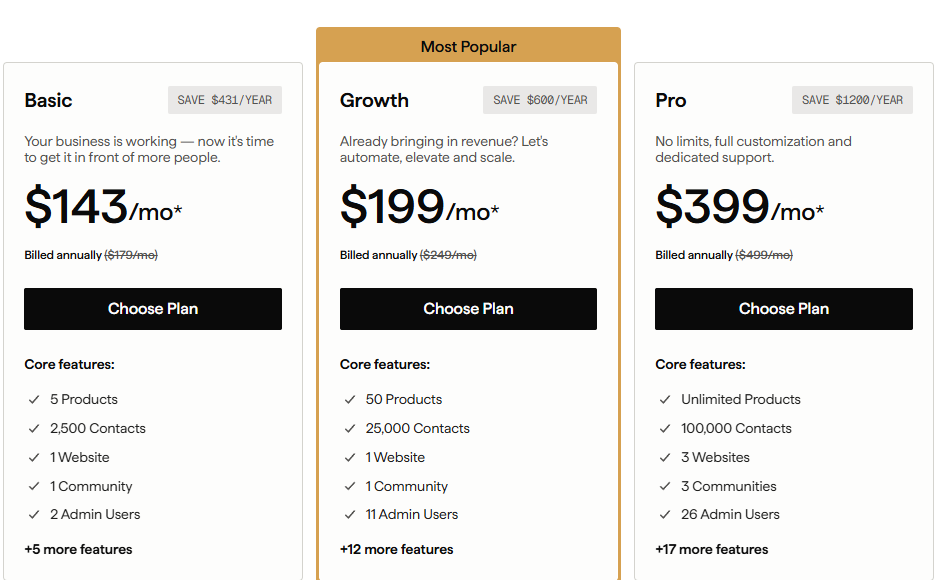
Kajabi Basic Plan: $143/month (annual) or $179/month (monthly)
|
Feature |
Details |
|---|---|
|
Price | |
|
Products |
5 |
|
Contacts |
2,500 |
|
Website |
1 (custom domain) |
|
Community |
1 (unlimited access groups) |
|
Admin Users |
2 |
Kajabi’s Basic plan costs roughly 12x MasterStudy’s annual license per year, but includes email marketing, a website builder, community, coaching tools, sales funnels, and checkout.
All features that would require separate subscriptions alongside MasterStudy. Zero transaction fees on all plans mean Kajabi takes no cut of your revenue. The plan includes unlimited marketing emails, unlimited landing pages, and unlimited funnels.
|
Basic Plan Pros |
Basic Plan Cons |
|---|---|
|
✅ No additional tools needed |
❌ $143/month requires commitment, though it replaces multiple subscriptions |
|
✅ Zero transaction fees |
❌ Limited to 5 products |
|
✅ Email marketing and automations included |
❌ 2,500 contact ceiling forces upgrades |
|
✅ Community with gamification built in |
❌ No branded mobile app |
The Bottom Line 👉 Basic works for creators who want their entire business (courses, email, community, and sales) running from one platform without managing a WordPress stack.
Kajabi Growth Plan: $199/month (annual) or $249/month (monthly)
|
Feature |
Details |
|---|---|
|
Price | |
|
Products |
50 |
|
Contacts |
25,000 |
|
Admin Users |
11 |
|
Additional Features |
Affiliate program, webhooks, advanced automations |
The Growth plan provides room to scale: 50 products and 25,000 contacts accommodate most established course businesses.
The affiliate program lets creators recruit partners who earn commissions via tracked links or coupon codes. Advanced automations with conditional branching replace the need for external marketing automation tools.
|
Growth Plan Pros |
Growth Plan Cons |
|---|---|
|
✅ 50 products handles a full curriculum |
❌ $199/month requires consistent revenue |
|
✅ Affiliate program included |
❌ Still only 1 website |
|
✅ 25,000 contacts for list building |
❌ No branded mobile app |
|
✅ 11 admin users for team collaboration |
❌ No API access |
The Bottom Line 👉 Growth suits established creators with multiple products and growing email lists who need affiliate marketing and team access.
Kajabi Pro Plan: $399/month (annual) or $499/month (monthly)
|
Feature |
Details |
|---|---|
|
Price | |
|
Products |
Unlimited |
|
Contacts |
100,000 |
|
Websites |
3 |
|
Communities |
3 |
|
Admin Users |
26 |
|
Exclusive Features |
Branded mobile app, API access, custom code editor |
Pro removes all meaningful limits and includes a branded mobile app published under the creator’s own name in the App Store (a $199/month value included in the plan).
API access enables custom integrations, and the custom code editor allows website personalization. Three websites and communities support creators running multiple brands.
|
Pro Plan Pros |
Pro Plan Cons |
|---|---|
|
✅ Branded mobile app included |
❌ $399/month requires strong revenue |
|
✅ Unlimited products |
❌ Overkill for most solo creators |
|
✅ API access for custom integrations |
❌ 100,000 contacts still capped |
|
✅ 3 websites for multiple brands |
❌ Annual commitment for best pricing |
The Bottom Line 👉 Pro makes sense for established businesses earning consistent revenue who need a branded app, unlimited products, and team collaboration at scale.
MasterStudy LMS Feature Value Breakdown (vs Kajabi)
Pricing Model and Total Cost
MasterStudy’s Approach: MasterStudy charges a flat annual fee ($149–$599/year) with no per-student pricing, making it one of the most affordable LMS solutions at face value.
However, the plugin only covers course delivery. Creators still need WordPress hosting ($30–100/month), an email marketing platform ($15–100/month), and potentially community, coaching, and funnel tools. A realistic monthly stack cost ranges from $70–$250+ depending on needs.
Source: StylemixThemes
Kajabi’s Approach: Kajabi charges $143–$399/month with everything included. No additional tool subscriptions, no hosting costs, and no transaction fees.
The higher sticker price buys consolidation: one login, one support team, one bill, and zero integration maintenance. Creators also get unified analytics (seeing exactly how email campaigns drive course enrollments and revenue) which is hard to replicate when data lives across separate tools.
Source: Kajabi
🪙 Value Verdict: MasterStudy is better for budget-conscious WordPress users who already have their tool stack set up. Kajabi is better for creators who value simplicity and want predictable, all-inclusive costs without managing multiple subscriptions.
Course Creation and Delivery
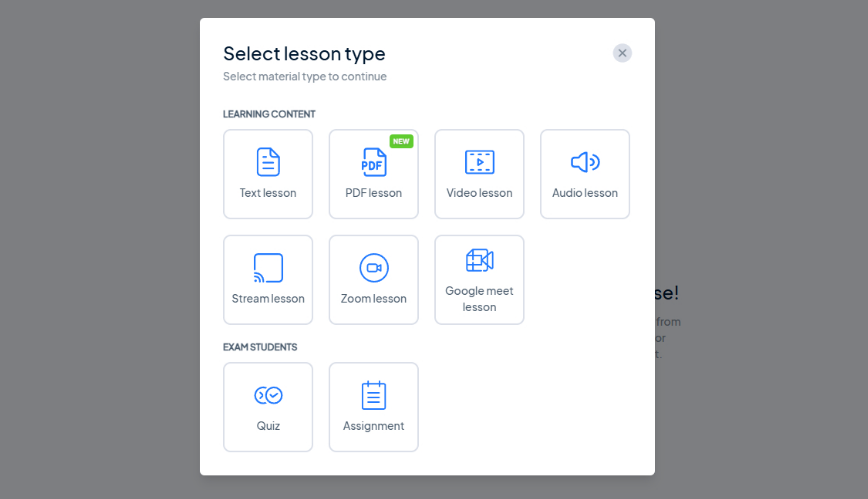
MasterStudy’s Approach: MasterStudy offers a drag-and-drop course builder with seven lesson types (text, video, PDF, stream, Zoom, audio, Google Meet), SCORM import, and AI-powered course generation through AI Lab.
The quiz system includes 7 question types with question banks, grading, and a gradebook. Page builder integration (Elementor, Divi, Gutenberg) gives full design control.
Source: StylemixThemes
Kajabi’s Approach: Kajabi provides courses with modules, lessons, quizzes, drip scheduling, content locking, cohort-based formats, and completion certificates. An AI Course Generator scaffolds outlines from prompts. Video transcriptions, translations, and dubbed voiceovers in 70+ languages come built in on Growth and Pro plans.
🪙 Value Verdict: MasterStudy offers more granular LMS-specific features (SCORM, question banks, gradebook, 7 lesson types, page builder flexibility). Kajabi offers a simpler course experience with stronger video localization. For pure course delivery depth, MasterStudy wins. For creators who need courses as one part of a broader digital products business, Kajabi integrates course delivery with everything else.
Marketing and Audience Building
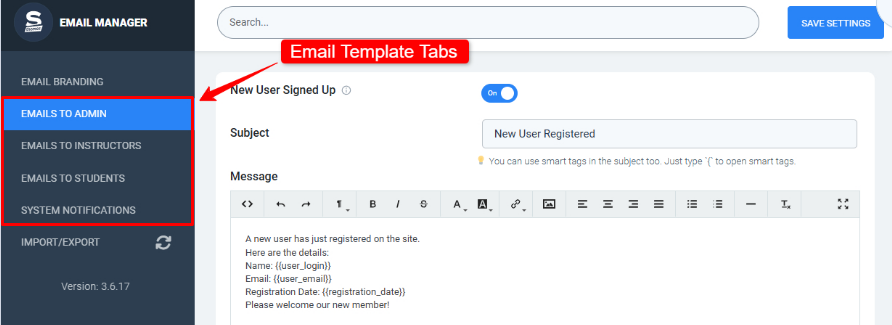
MasterStudy’s Approach: MasterStudy includes an email manager with 44 transactional email templates covering enrollment, completion, and inactivity notifications.
Beyond that, marketing requires external tools. No landing page builder, no opt-in forms, no broadcast email, no sales funnels, and no automation sequences are included. Creators must integrate with Mailchimp, ConvertKit, or ActiveCampaign through OttoKit or Zapier.
Source: StylemixThemes
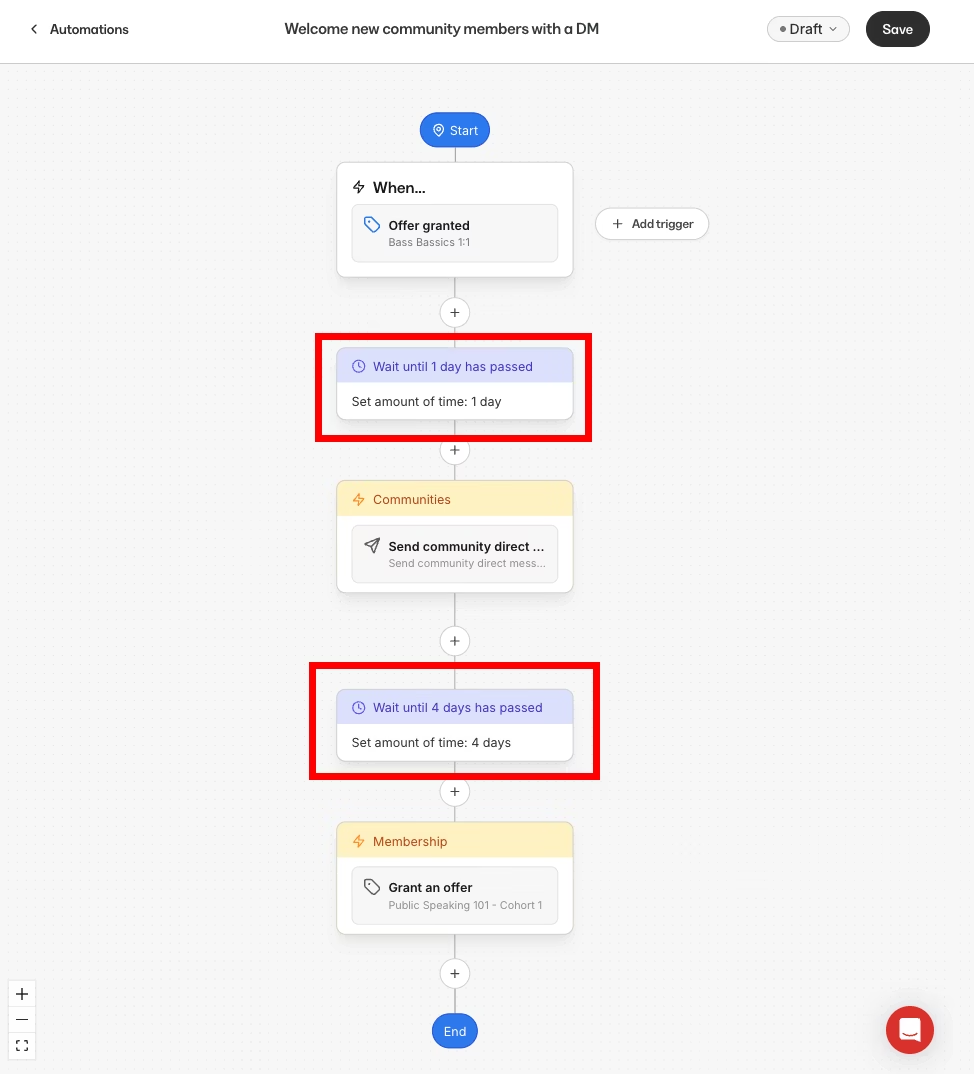
Kajabi’s Approach: Kajabi includes a complete marketing suite: email broadcasts and sequences, landing pages, opt-in forms, funnels with pre-built templates, behavioral automations with conditional branching, A/B testing, and a custom email domain. All marketing shares the same data layer as products and payments, so a purchase can trigger a sequence without external connectors.
Source: Kajabi
🪙 Value Verdict: Kajabi is clearly better for marketing. MasterStudy’s email manager handles notifications but not audience building or nurturing. Creators using MasterStudy must budget $30–100+/month for a separate marketing platform and accept the friction of connecting systems.
Community and Coaching
MasterStudy’s Approach: MasterStudy has no native community feature. Creators can integrate PeepSo for social networking or rely on external platforms. No coaching tools exist within the plugin. Scheduling, video calls, and client management require separate services.
Kajabi’s Approach: Kajabi includes a community product with channels, live rooms (with breakout groups), gamification, leaderboards, challenges, direct messaging, and moderation tools.
The coaching product provides native 1:1 and group coaching with scheduling, live video, session notes, and automatic recording uploads. Both integrate with the same payment and automation systems.

Source: Kajabi
🪙 Value Verdict: Kajabi is the clear choice for creators who offer coaching or rely on community engagement for retention. MasterStudy has no native solution for either use case.
Data Ownership and Customization
MasterStudy’s Approach: As a self-hosted WordPress plugin, MasterStudy gives creators complete ownership of their data, database, and files.
The Developer’s Guide documents hooks, template overrides, and custom fields for code-level customization. Creators can modify any aspect of the platform, integrate with any WordPress plugin, and migrate to any host.
Kajabi’s Approach: Kajabi is a hosted platform where data lives on Kajabi’s servers. Customization is limited to what the visual builder and custom code editor (Pro plan only) allow. API access is restricted to Pro or available as a $25/month add-on. You cannot modify underlying platform code or directly access the database.
🪙 Value Verdict: MasterStudy is better for developers and organizations requiring full data sovereignty, custom integrations, or regulatory control. Kajabi trades customization for convenience. Most creators never need code-level access, but those who do will find Kajabi limiting.
Final Verdict: MasterStudy LMS vs Kajabi
The choice between MasterStudy LMS and Kajabi reflects a fundamental decision about how you want to run your knowledge business:
👍 MasterStudy LMS is a WordPress-native LMS plugin that delivers full course features at a fraction of hosted platform pricing.
With plans from $0 to $599/year covering unlimited students and all 31 add-ons, it lets WordPress users build course marketplaces, corporate training portals, and individual course businesses with full data ownership and code-level control.
This self-hosted model works best for WordPress developers and agencies building for clients, organizations requiring SCORM compliance or custom integrations, budget-conscious educators comfortable managing their own hosting, and anyone who values owning their platform over renting it.
Get started with MasterStudy LMS here.
👉 Kajabi is a platform built on the principle that entrepreneurs should spend time on expertise and strategy, not on technology management.
By combining courses, coaching, community, email marketing, website building, and sales tools in plans from $143 to $399/month with 0% platform transaction fees, it eliminates the multi-tool stack that MasterStudy creators typically assemble.
This consolidated approach makes it the better fit for creators building digital businesses across multiple formats (courses, coaching, memberships, community), entrepreneurs who want one bill, one login, and one support team instead of managing 5+ subscriptions, and anyone who calculates that $143/month for everything costs less than $70–$250/month in stacked tools plus the time spent maintaining them.
The fundamental difference is scope. MasterStudy asks “How can we build the best LMS plugin for WordPress?” Kajabi asks “How can we run an expert’s entire business from one place?”
Neither answer is wrong. It depends on whether you need a course delivery tool or a complete business platform.
MasterStudy LMS Pricing FAQ
Is MasterStudy LMS really free?
Yes, MasterStudy offers a permanently free version on WordPress.org with core course building, quizzes (8 question types), payment processing via PayPal and Stripe, and WPML multilingual support.
The free tier has no time limit and no student caps. Premium add-ons like certificates, drip content, Zoom integration, and AI Lab require the paid plan starting at $149/year.
How much does MasterStudy LMS Pro cost per month?
The Single Site plan costs $149/year, which breaks down to approximately $12.40/month.
However, total operating costs include WordPress hosting ($30–100/month), payment processor fees (2.9% + $0.30 per transaction through Stripe or PayPal), and any additional tools for email marketing or community. Realistic monthly costs for a solo creator range from $70–$150+.
Does MasterStudy charge per student?
No. MasterStudy uses flat annual licensing with no per-student, per-course, or per-transaction fees from the plugin itself. Whether you have 10 students or 10,000, the license cost stays the same. Payment processor fees (Stripe, PayPal) are the only per-transaction costs.
What happens if I don’t renew my MasterStudy subscription?
If your annual subscription lapses, Pro features stop working. The plugin does not revert to a permanently usable legacy version. You lose access to premium add-ons, priority support, and plugin updates. A lifetime purchase option is available to avoid renewal concerns entirely.
Is Kajabi worth the higher price compared to MasterStudy?
It depends on your total tool stack cost and how you value your time. If you already run WordPress and only need course delivery, MasterStudy at $149/year is far more economical.
But if you currently pay for hosting, email marketing, community software, coaching tools, and a funnel builder separately, those costs often exceed Kajabi’s $143/month while requiring more management overhead. Kajabi also includes 0% platform transaction fees, which saves money at scale.
Can MasterStudy LMS handle memberships and subscriptions?
Yes. The Pro plan includes native subscriptions and memberships with configurable billing intervals, free trial periods, and granular course access controls.
Memberships can grant sitewide or category-level access, while subscriptions attach to individual courses. WooCommerce integration adds 75+ payment gateways, though it cannot run simultaneously with the native subscription system.
Does MasterStudy LMS have a mobile app?
No. MasterStudy does not offer a dedicated iOS or Android app. Students access courses through mobile browsers. Kajabi includes a shared mobile app on all plans and a branded mobile app (published under your own name in the App Store) on the Pro plan.
Which platform is better for corporate training?
MasterStudy has specific advantages for corporate training: SCORM import, group course purchasing with CSV bulk enrollment, and no per-seat pricing. For organizations with existing WordPress infrastructure and SCORM content libraries, MasterStudy is the more practical and affordable choice.
Kajabi lacks SCORM support, group purchasing, and enterprise training features. It is designed for individual creators rather than corporate L&D departments.