


If you’ve ever navigated LearnDash’s layered pricing, calculating whether the $199/year base plugin covers your needs or if you’ll also need ProPanel ($99/year), Groups Management ($99/year), and a branded mobile app ($1,199/year), while remembering you still need WordPress hosting separately, you know that WordPress LMS pricing can feel like assembling a toolkit one piece at a time.
LearnDash is the leading LMS plugin for WordPress, powering courses for organizations from solo creators to the University of Florida and Fortune 500 companies. The platform offers course-building tools with unlimited students, zero revenue-sharing fees, and the control of self-hosted WordPress.
But running a knowledge business now extends beyond course delivery into marketing, community building, coaching, and sales automation. LearnDash’s LMS-only approach means you’ll need additional tools and plugins to run a complete business.
We’ve analyzed LearnDash’s pricing tiers, add-on costs, and total cost of ownership. It’s the right choice if:
- You’re committed to WordPress and want full ownership of your platform
- You have technical skills (or a developer) to manage hosting, updates, and plugin compatibility
- Your primary need is structured course delivery with quizzes and assessments
- You want to avoid per-transaction platform fees on course sales
- You need SCORM/xAPI compliance for corporate or institutional training
LearnDash is not a good choice if:
- You want one platform that handles courses, marketing, community, and sales
- You prefer a managed solution without WordPress hosting and maintenance
- You need built-in email marketing and sales funnels alongside your courses
- You want coaching tools and community features without additional plugins
- You’d rather pay one predictable monthly fee than manage multiple annual licenses
In this case, consider Kajabi: a platform that bundles course creation, coaching, community, email marketing, website building, and sales tools into a single subscription, eliminating the need to assemble a multi-plugin WordPress stack.
We’ve included a detailed pricing comparison with Kajabi in this review, as the best choice for creators seeking a complete business platform beyond course delivery. If you’re eager to jump into the Kajabi pricing breakdown, go ahead and do so with this link.
LearnDash Pricing Summary
|
LearnDash |
Kajabi | |
|---|---|---|
|
Free Trial |
• No free plan • Interactive demo available • 30-day money-back guarantee |
• Free trial available • 30-day money-back guarantee • Full feature access |
|
Entry Level |
• Plugin: $199/year (1 site) • Unlimited courses/students • Hosting not included |
• Basic: $143/month (annual) • 5 Products, 2,500 contacts • Everything included |
|
Mid-Tier |
• Plugin: $399/year (10 sites) • Same features as 1-site • Add-ons sold separately |
• Growth: $199/month (annual) • 50 Products, 25,000 contacts • Coaching & community included |
|
Premium |
• Plugin: $799/year (unlimited sites) • Same features, more activations • Mobile app: $1,199/year extra |
• Pro: $399/month (annual) • Unlimited products, 100,000 contacts • Branded mobile app included |
|
Best For |
WordPress-committed course creators who want full platform ownership and assessment tools |
Knowledge entrepreneurs who want courses, coaching, community, marketing, and sales in one platform |
⭐ Create and manage your online courses with LearnDash using this link. It’s a powerful WordPress LMS plugin designed for creators, educators, and businesses that want full control over their learning platform.
LearnDash Pricing: In-Depth Overview
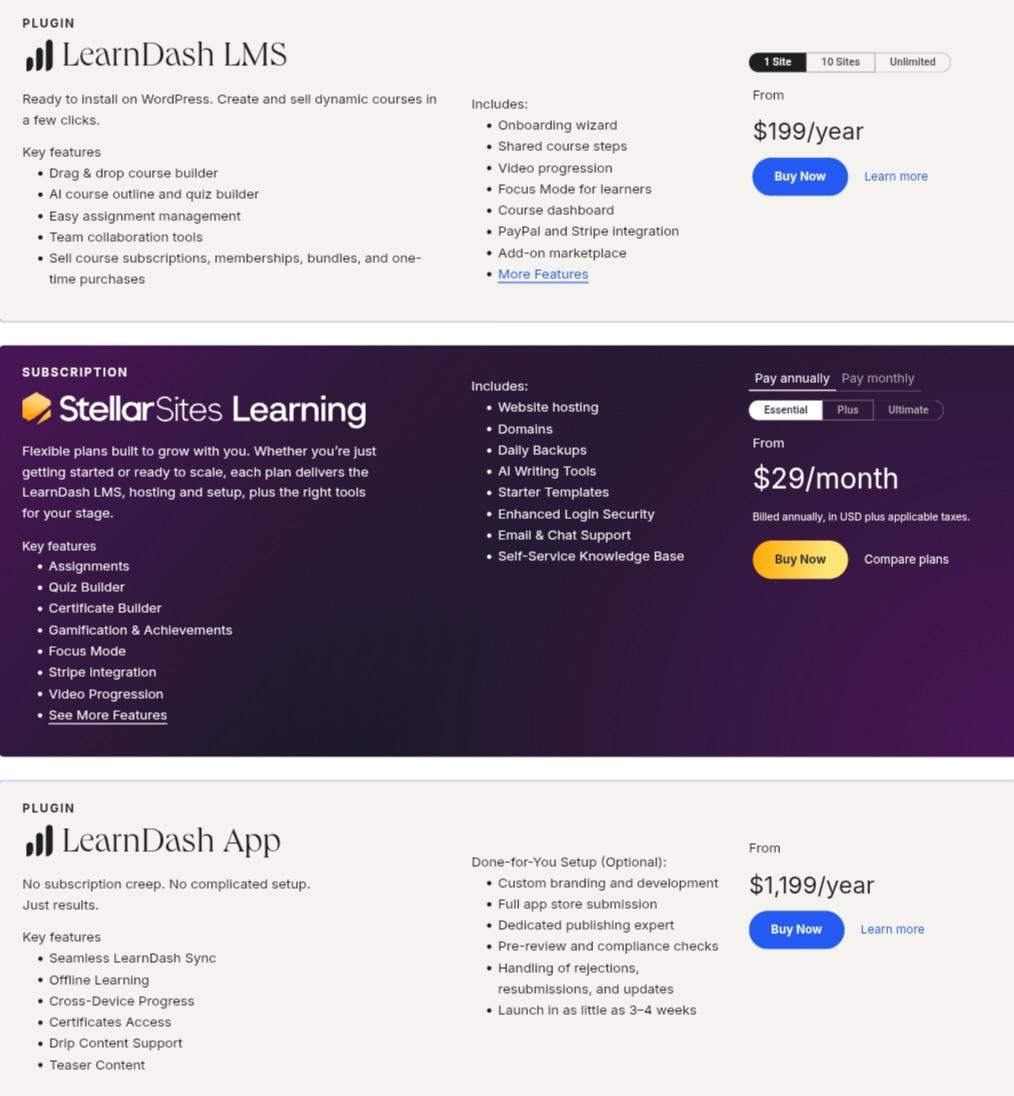
LearnDash operates on two product lines: a standalone WordPress plugin licensed annually by site count, and StellarSites Learning (formerly LearnDash Cloud), a managed WordPress hosting bundle.

The plugin targets technical users who already have WordPress infrastructure. StellarSites targets those who want simpler setup. Beyond base licenses, LearnDash sells premium add-ons, bundles, and a mobile app, creating a modular system where total cost depends on which capabilities you need.
Let’s examine each option.
LearnDash Plugin: 1 Site License, $199/year
|
Feature |
Details |
|---|---|
|
Price |
$199/year |
|
Site Activations |
1 WordPress site |
|
Courses |
Unlimited |
|
Students |
Unlimited |
|
Transaction Fees |
None from LearnDash |
|
Hosting |
Not included |
The 1-site license is the entry point for individual course creators. It includes the full LearnDash feature set: drag-and-drop course builder, AI course outline and quiz builder, assignment management, video progression, Focus Mode, Stripe and PayPal integration, and access to the free add-on marketplace.
You’ll need your own WordPress hosting, a compatible theme, and likely several paid add-ons to build a complete learning platform.
|
1 Site License Pros |
1 Site License Cons |
|---|---|
|
✅ Full feature set at entry price |
❌ WordPress hosting costs extra |
|
✅ Unlimited courses and students |
❌ Key features require paid add-ons |
|
✅ No per-student or revenue-share fees |
❌ Technical setup and maintenance required |
|
✅ 30-day money-back guarantee |
❌ Limited to one site activation |
The Bottom Line 👉 The 1-site license works for solo course creators already on WordPress, but the base price doesn’t reflect the true cost of a functional learning business.
LearnDash Plugin: 10 Sites License, $399/year
|
Feature |
Details |
|---|---|
|
Price |
$399/year |
|
Site Activations |
Up to 10 WordPress sites |
|
Features |
Identical to 1-site |
|
Per-Site Cost |
~$40/year |
|
Best For |
Agencies and multi-brand operators |
The 10-site license doubles the price for 10x the activations, making it economical for freelancers or agencies managing multiple client course sites. Features stay identical to the 1-site tier.
At roughly $40 per site annually, it’s the most cost-effective option for operators running several WordPress installations.
|
10 Sites License Pros |
10 Sites License Cons |
|---|---|
|
✅ Economical per-site cost |
❌ Still need hosting for each site |
|
✅ Same full feature set |
❌ Add-ons may need separate licenses |
|
✅ Good for agencies |
❌ Managing 10 WordPress sites is complex |
|
✅ Volume pricing without negotiation |
❌ No additional features over 1-site |
The Bottom Line 👉 The 10-site license suits agencies and multi-site operators, but the overhead of maintaining multiple WordPress installations adds hidden costs.
LearnDash Plugin: Unlimited Sites License, $799/year
|
Feature |
Details |
|---|---|
|
Price |
$799/year |
|
Site Activations |
Unlimited |
|
Features |
Identical to lower tiers |
|
Per-Site Cost |
Decreases with scale |
|
Best For |
Large agencies and enterprises |
The unlimited license removes all activation caps for agencies running large client portfolios or organizations deploying LearnDash across multiple internal training sites. Features stay identical.
The only differentiator across all three plugin tiers is site activation count.
|
Unlimited Sites License Pros |
Unlimited Sites License Cons |
|---|---|
|
✅ No activation limits |
❌ $799/year before add-ons or hosting |
|
✅ Scale without per-site cost anxiety |
❌ Same maintenance burden multiplied |
|
✅ Suitable for enterprise deployment |
❌ No priority support included |
|
✅ Locked pricing regardless of growth |
❌ Each site still needs individual management |
The Bottom Line 👉 Unlimited makes financial sense for organizations deploying across many sites, but operational complexity scales with each new installation.
StellarSites Learning (Managed Hosting): $29–$99/month
|
Plan |
Annual Price |
Monthly Price |
Key Inclusions |
|---|---|---|---|
|
Essential |
$29/month |
$39/month |
LearnDash + hosting + SSL + backups |
|
Plus |
$55/month |
$69/month |
Enhanced features |
|
Ultimate |
$79/month |
$99/month |
Full feature set |
StellarSites Learning bundles the LearnDash plugin with WordPress hosting, daily backups, SSL, security monitoring, KadenceWP page builder, SolidWP maintenance tools, and email/chat support.
This eliminates the need to source and manage hosting separately, targeting creators who want LearnDash without WordPress infrastructure management.
|
StellarSites Learning Pros |
StellarSites Learning Cons |
|---|---|
|
✅ No separate hosting to manage |
❌ Higher ongoing cost than plugin alone |
|
✅ Includes security and backups |
❌ Less control than self-hosted |
|
✅ AI site builder wizard included |
❌ Cannot meet GDPR EU data residency requirements |
|
✅ Email and chat support |
❌ Still lacks marketing and community tools |
The Bottom Line 👉 StellarSites Learning simplifies WordPress management but doesn’t address the business tools gap. It’s a hosting convenience, not a feature upgrade.
LearnDash Add-On Costs and True Cost of Ownership
Beyond the base license, LearnDash’s true costs emerge through premium add-ons and required external services:
Premium Add-Ons (Annual):
|
Add-on |
Price/Year |
What It Adds |
|---|---|---|
|
ProPanel (analytics) |
$99 |
Reporting dashboard and learner activity tracking |
|
Instructor Role |
$99 |
Multi-instructor management with commissions |
|
Groups Management |
$99 |
Group/team enrollment tools |
|
Group Registration |
$80 |
Self-registration for group leaders |
|
Gradebook |
$49 |
Weighted grading and report cards |
|
Notes |
$49 |
Learner note-taking within courses |
|
Ratings & Reviews |
$49 |
Course ratings and feedback collection |
|
Mobile App |
$1,199 |
Branded iOS/Android app |
Bundles (Plugin + Add-ons):
- Student Success Bundle: $249/year
- Professional Suite Bundle: $399/year
- Marketplace Suite Bundle: $399/year
- Ultimate Course Creator Bundle: $499/year
External Costs (Not Included):
- WordPress hosting: $10–$50+/month depending on provider and traffic
- Email marketing tool: $20–$100+/month (Mailchimp, ConvertKit, etc.)
- Community plugin: $20–$50+/month (BuddyBoss, etc.)
- Landing page/funnel builder: $20–$100+/month
- Scheduling tool for coaching: $10–$30+/month
Realistic Total Cost Example: A course creator using LearnDash with ProPanel, Groups Management, a branded mobile app, WordPress hosting, and an email marketing tool could spend $300–$500+/month in combined annual costs, before adding community, coaching, or sales funnel tools.
Where LearnDash Falls Short
LearnDash delivers solid course-building tools with full WordPress ownership, but its plugin-focused architecture creates problems for creators who need to run a complete knowledge business:
Requires Assembling a Multi-Tool Stack
- Course delivery is only one piece of a knowledge business. Email marketing, landing pages, community, coaching, and sales tools all require separate subscriptions
- Each additional plugin introduces compatibility risks, update conflicts, and maintenance overhead
- The combined cost of a full stack often exceeds what all-in-one platforms charge
No Built-In Community or Coaching
- Community features require third-party plugins like BuddyBoss or BuddyPress
- Coaching delivery (scheduling, session management, live video) needs external tools entirely
- G2 reviewers note the absence of native social learning features as a limitation
WordPress Maintenance Burden
- Plugin updates, theme compatibility, hosting management, and security patches fall on the creator
- Multiple G2 reviewers report slow dashboard performance on complex WordPress sites
- Capterra reviewers flag a steep learning curve for non-technical users navigating the WordPress admin
Hidden Costs Accumulate Quickly
- The $199/year base price is misleading when ProPanel ($99), Groups ($99), and a mobile app ($1,199) are needed
- WordPress hosting adds $120–$600+/year depending on traffic and provider
- Total cost of ownership for a full-featured deployment approaches or exceeds all-in-one platform pricing
These limitations have led many course creators to explore platforms that bundle the full business toolkit into one subscription.
Best LearnDash Alternative: Kajabi
Kajabi replaces the entire multi-plugin WordPress stack with a single platform covering courses, coaching, community, email marketing, website, and sales.
For those who find LearnDash’s add-on costs frustrating, the WordPress maintenance burden excessive, and the absence of marketing and community tools limiting, Kajabi offers a different approach: one subscription that includes everything a knowledge entrepreneur needs to create, market, sell, and deliver expertise without managing hosting, plugins, or integrations.
Powering over 100,000 expert businesses and $10 billion in creator earnings, Kajabi serves coaches, course creators, and educators who want to focus on their expertise rather than their technology stack. The platform combines course delivery, coaching programs, community features, email marketing with automation, a website builder, and a sales system with zero transaction fees on all plans.
Kajabi works well for knowledge entrepreneurs building multi-product businesses, coaches who need scheduling and live video alongside courses, and creators who value time spent teaching over time spent managing WordPress.
⭐ Get instant access to Kajabi with an extended 30-day free trial — double the standard trial length. Build your website, courses, funnels, and email marketing risk-free with this exclusive offer.
Kajabi Basic Plan: $143/month (annual) or $179/month (monthly)
|
Feature |
Details |
|---|---|
|
Price |
$143/month billed annually |
|
Products |
5 |
|
Contacts |
2,500 |
|
Websites |
1 |
|
Communities |
1 |
|
Admin Users |
2 |
|
Transaction Fees |
None |
Kajabi’s Basic plan includes courses, coaching, community, unlimited marketing emails, unlimited landing pages, unlimited funnels, automations, webhooks, affiliate programs, and a custom domain.
These are all features that would require multiple separate tools and plugins on LearnDash. At $143/month annually, it costs more upfront than LearnDash’s base plugin, but eliminates separate hosting, email marketing, community, and landing page subscriptions.
|
Basic Plan Pros |
Basic Plan Cons |
|---|---|
|
✅ Everything included in one price |
❌ Higher monthly cost than plugin alone |
|
✅ No WordPress maintenance |
❌ Limited to 5 products |
|
✅ Built-in email marketing and automations |
❌ 2,500 contact ceiling |
|
✅ Zero transaction fees |
❌ No branded mobile app |
The Bottom Line 👉 Basic suits solo creators launching their first few products who want to avoid the complexity and combined cost of a WordPress multi-plugin stack.
Kajabi Growth Plan: $199/month (annual) or $249/month (monthly)
|
Feature |
Details |
|---|---|
|
Price |
$199/month billed annually |
|
Products |
50 |
|
Contacts |
25,000 |
|
Admin Users |
11 |
|
Communities |
1 |
|
Coaching |
Native scheduling and live video |
|
Additional |
All Basic features expanded |
The Growth plan scales to 50 products and 25,000 contacts while keeping the same feature set.
For course creators with growing catalogs and email lists, this tier removes the upgrade anxiety of LearnDash’s per-add-on pricing. Coaching with built-in scheduling, live video, breakout rooms, and automatic session recording replaces separate scheduling and video conferencing tools.
|
Growth Plan Pros |
Growth Plan Cons |
|---|---|
|
✅ 50 products handles full catalogs |
❌ $199/month is a real commitment |
|
✅ Native coaching eliminates scheduling tools |
❌ Still limited to 1 community |
|
✅ 11 admin users for team collaboration |
❌ No branded mobile app |
|
✅ 25,000 contacts with unlimited emails |
❌ No API access |
The Bottom Line 👉 Growth fits established creators running multiple courses and coaching programs who want everything managed from one dashboard.
Kajabi Pro Plan: $399/month (annual) or $499/month (monthly)
|
Feature |
Details |
|---|---|
|
Price |
$399/month billed annually |
|
Products |
Unlimited |
|
Contacts |
100,000 |
|
Websites |
3 |
|
Communities |
3 |
|
Admin Users |
26 |
|
Branded Mobile App |
Included ($199/month value) |
|
API Access |
Included |
Pro removes all product limits and includes a branded mobile app published under the creator’s own name in the App Store, a feature that costs $1,199/year as a separate purchase with LearnDash.
The plan also includes API access, custom code editor, and 3 websites for creators managing multiple brands.
|
Pro Plan Pros |
Pro Plan Cons |
|---|---|
|
✅ Branded mobile app included |
❌ $399/month is premium pricing |
|
✅ Unlimited products removes all ceilings |
❌ May exceed needs for smaller creators |
|
✅ 3 websites for multi-brand businesses |
❌ Contact-based scaling means eventual limits |
|
✅ API access for custom integrations |
❌ Annual commitment for best pricing |
The Bottom Line 👉 Pro serves established businesses running multiple brands, large communities, and high-volume operations where the included mobile app and unlimited products justify the investment.
Kajabi’s Included Features (No Add-Ons Required)
Where LearnDash requires separate purchases for extended functionality, Kajabi includes the following across all plans at no extra cost:
Marketing & Sales:
- Unlimited email campaigns and sequences
- Unlimited landing pages and sales funnels
- Automations with conditional logic
- Affiliate program management
- Checkout pages with order bumps and upsells
- 140+ currency acceptance through Kajabi Payments
Community & Coaching:
- Community with channels, live rooms, gamification, and leaderboards
- 1:1 and group coaching with built-in scheduling and live video
- Direct messaging and event management
AI & Content:
- Cofounder AI for strategy, copy, and product planning
- AI-powered video dubbing across 100+ languages
- Creator Studio for video repurposing
⭐ If you’ve been thinking about starting your online business, this is your sign. Get 30 days of Kajabi free instead of the usual 14 days when you use this special link — no pressure, no rush, just more time to grow.
LearnDash Feature Value Breakdown (vs Kajabi)
Total Cost of Ownership
LearnDash’s Approach: LearnDash’s $199/year base price looks attractive, but building a full knowledge business requires assembling a stack.
A realistic deployment with ProPanel ($99/year), Groups Management ($99/year), WordPress hosting ($240–$600/year), email marketing ($240–$1,200/year), and a community plugin ($240–$600/year) pushes annual costs to $1,100–$2,800+. That’s without a mobile app ($1,199/year) or landing page builder.
Kajabi’s Approach: Kajabi’s $143–$399/month annual pricing ($1,716–$4,788/year) includes every business tool in one subscription: courses, coaching, community, email, landing pages, funnels, automations, website, checkout, and affiliate management. No additional tools, no hosting fees, no compatibility issues. The higher sticker price buys a complete, maintained system.
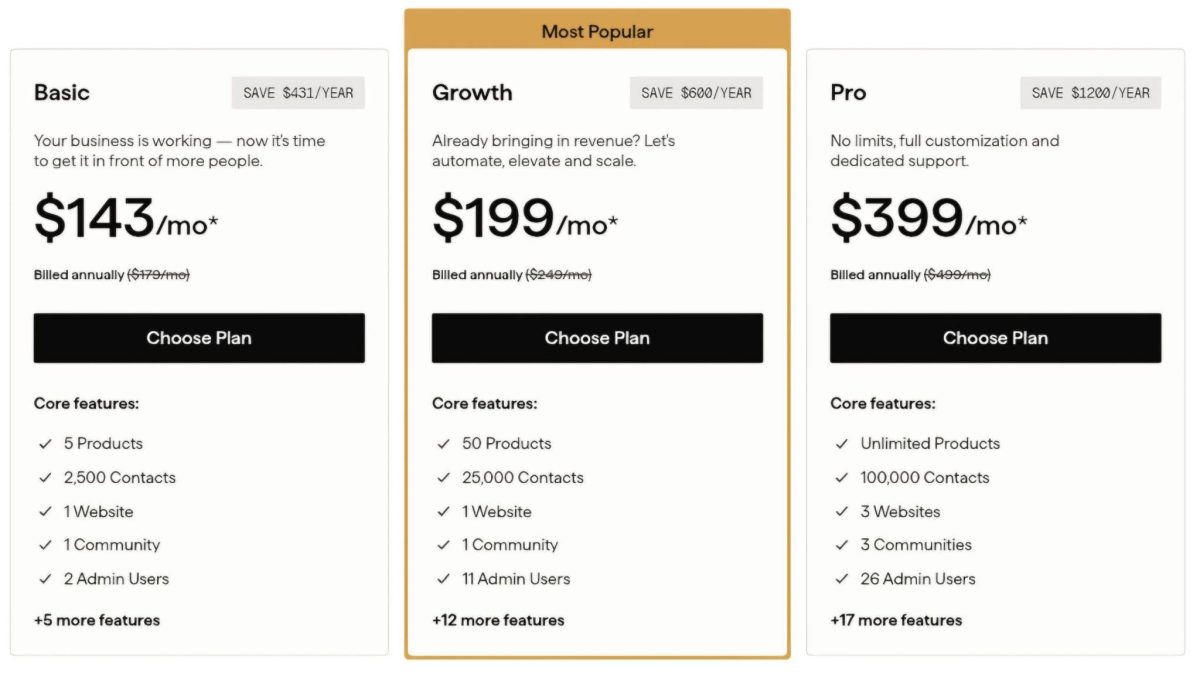
🪙 Value Verdict: For creators who only need basic course delivery on an existing WordPress site, LearnDash is more affordable. For creators building a full business with marketing, community, and coaching, Kajabi’s pricing often matches or beats the combined cost of a LearnDash stack while eliminating maintenance overhead.
Course Creation and Delivery
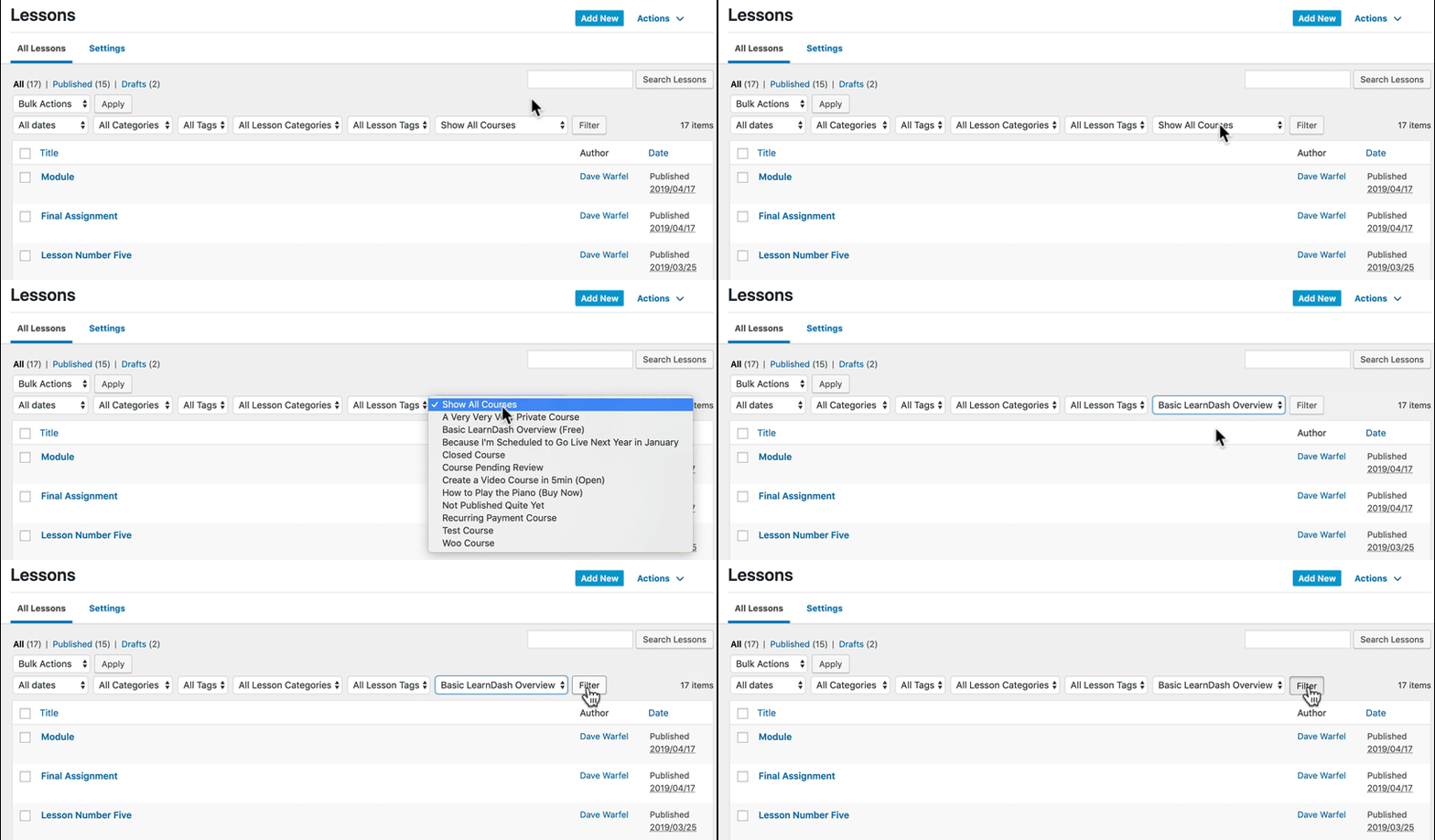
LearnDash’s Approach: LearnDash’s course builder offers eight quiz question types, drip-feed scheduling with three trigger modes, video progression enforcement, prerequisites, cohort-based start/end dates, and an AI Course Outline Builder. The platform supports SCORM/xAPI through third-party integrations, making it suitable for formal certification and corporate training programs.
Source: LearnDash
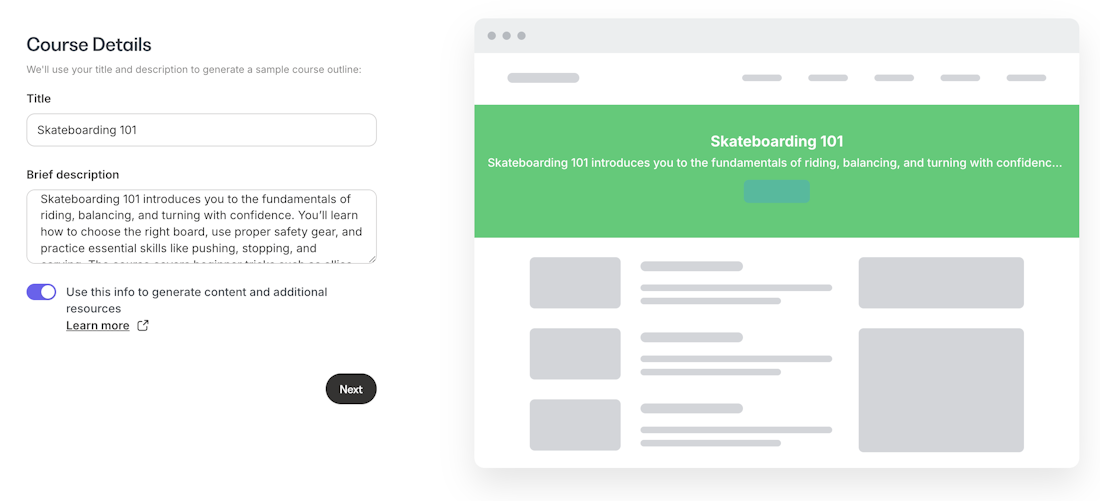
Kajabi’s Approach: Kajabi covers course creation with modules, lessons, drip scheduling, content locking, quizzes, completion certificates, and cohort-based courses with live video sessions. An AI Course Generator scaffolds outlines from prompts.
Source; Kajabi
While fewer quiz types are available than LearnDash, the course system connects directly to the platform’s marketing, community, and coaching tools. A student completing a course can automatically enter a coaching program or community tier without external automation.
🪙 Value Verdict: LearnDash is stronger for assessment-heavy courses, certification programs, and organizations requiring SCORM compliance. Kajabi is stronger for creators who want course delivery connected to marketing, coaching, and community in one workflow.
Marketing and Audience Growth
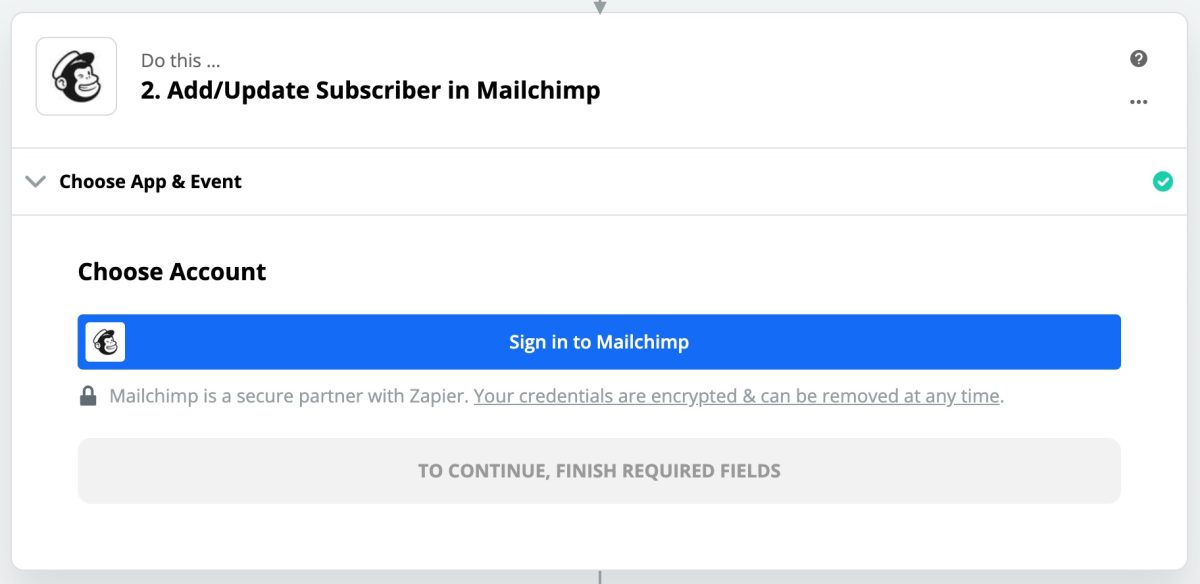
LearnDash’s Approach: LearnDash has no built-in email marketing, landing pages, or sales funnels. Creators must integrate external tools (typically Mailchimp, ConvertKit, or ActiveCampaign for email, plus a separate page builder for sales pages).
Source: LearnDash
Each integration adds cost and potential failure points. Marketing automation requires Zapier ($20–$100+/month) to connect LearnDash events like enrollment and completion to email sequences.
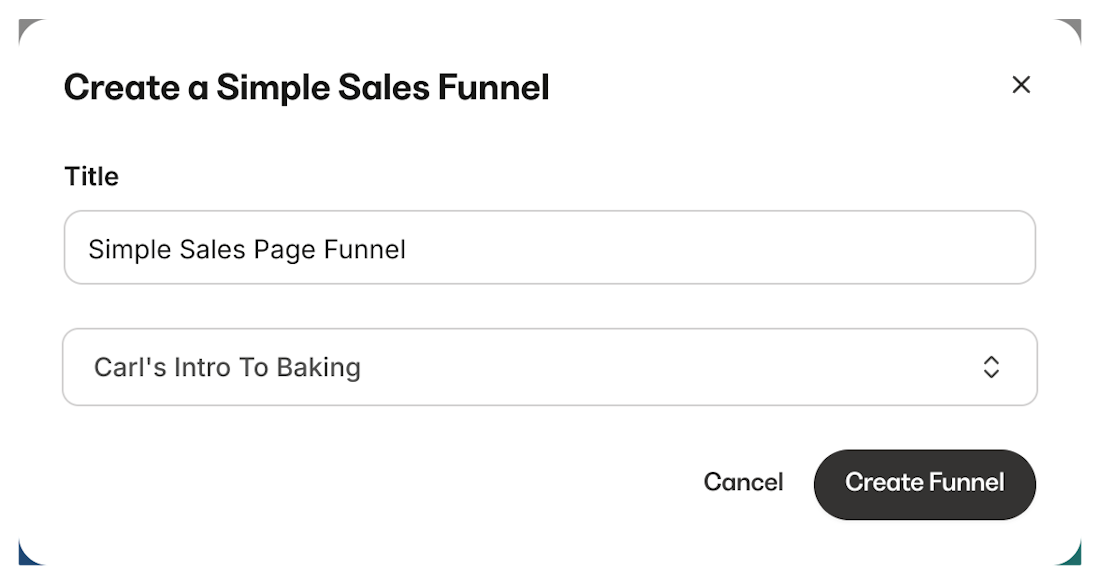
Kajabi’s Approach: Kajabi includes unlimited marketing emails, email sequences, A/B testing, behavioral automations, landing pages, and multi-step funnels on all plans.
Source: Kajabi
Because marketing and course delivery share the same data layer, automations can trigger based on lesson completion, quiz results, or purchase behavior without external connectors. The built-in funnel templates cover lead magnets, webinars, and product launches.
🪙 Value Verdict: Kajabi is the clear winner for marketing. LearnDash creators must build and maintain a separate marketing stack, while Kajabi provides tools that share data with the course system natively.
Platform Ownership and Control
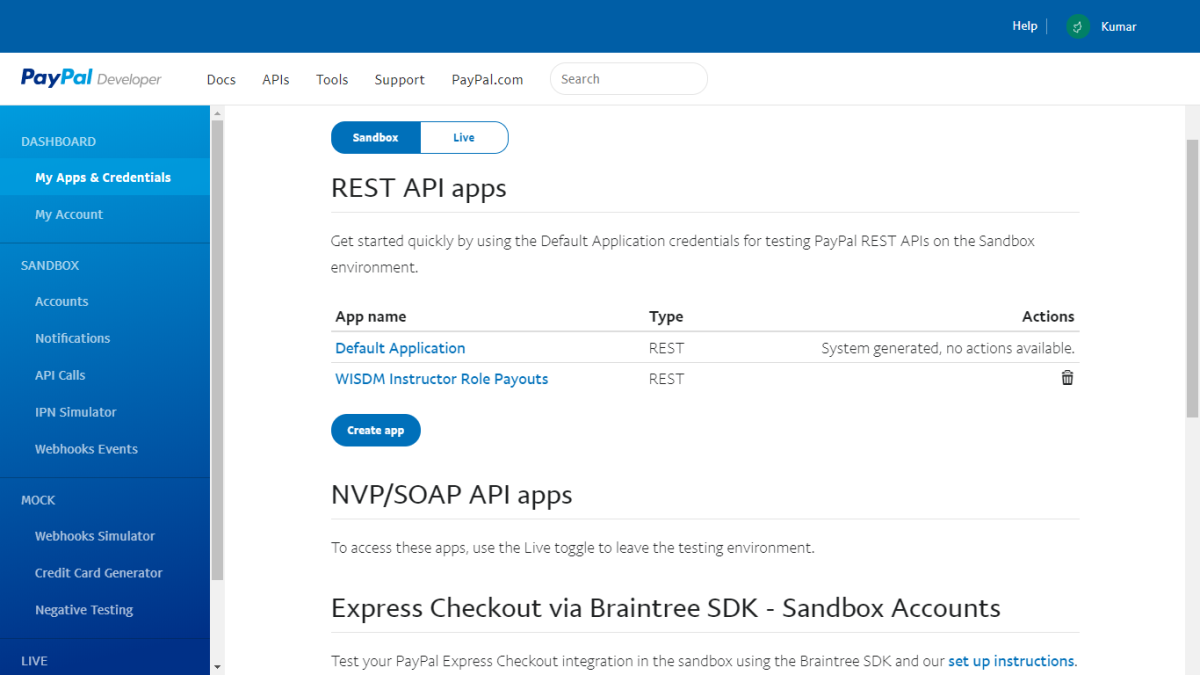
LearnDash’s Approach: As a WordPress plugin, LearnDash gives creators full ownership of their data, content, and infrastructure. You control your hosting provider, can access the database directly, customize with code, and migrate to different hosts. The REST API and WordPress hook system enable extensive customization. No vendor can revoke access to your content or student data.
Source: LearnDash
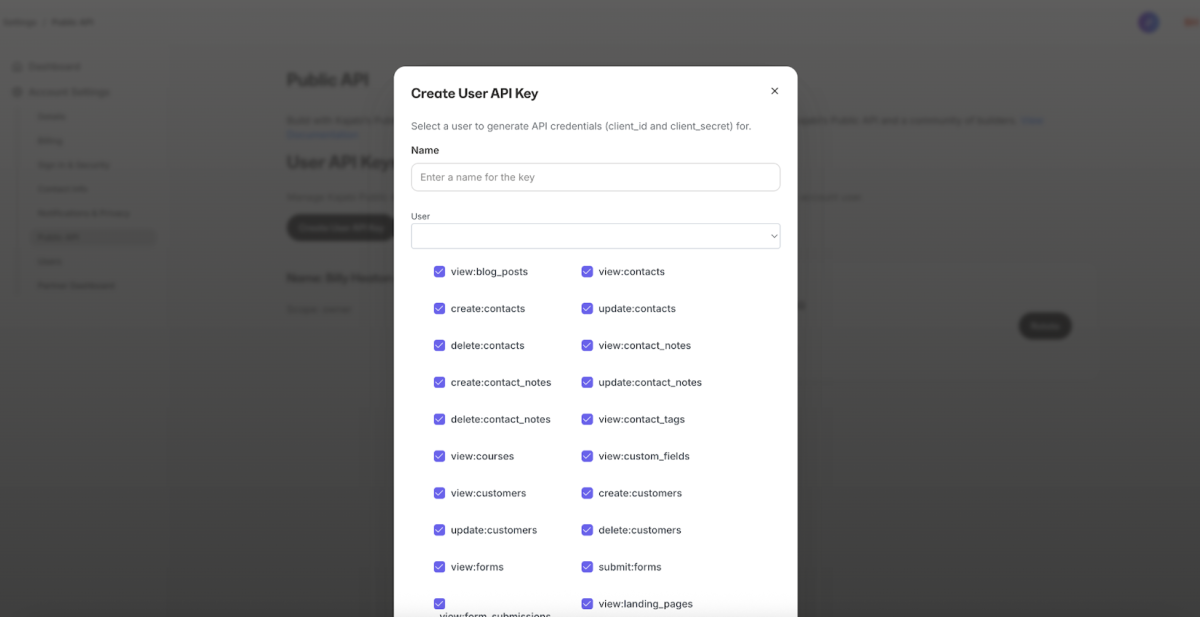
Kajabi’s Approach: Kajabi is a hosted platform where content, student data, and business operations live on Kajabi’s servers. The platform provides export capabilities and API access (Pro plan), but you depend on Kajabi’s infrastructure and terms of service. The trade-off: zero maintenance responsibility. Security, uptime, and updates are Kajabi’s problem.
Source: Kajabi
🪙 Value Verdict: LearnDash is stronger for organizations that require full data ownership, self-hosting, or custom development. Kajabi is stronger for creators who value not managing infrastructure over controlling every technical detail.
Final Verdict: LearnDash vs Kajabi
The choice between LearnDash and Kajabi depends on whether you need a focused LMS tool or a complete business platform:
👍 LearnDash is a WordPress LMS plugin for creators and organizations that want full platform ownership with course delivery capabilities. With pricing from $199 to $799/year for the plugin license (plus hosting and add-ons), it offers unlimited courses and students with zero revenue-sharing fees, quiz and assessment tools, and the extensibility of the WordPress ecosystem.
This model works best for WordPress-committed creators with technical resources, organizations requiring SCORM/xAPI compliance, agencies managing multiple client sites, and builders who prioritize platform ownership over convenience.
Get started with LearnDash here.
👉 Kajabi is a business platform built so knowledge entrepreneurs don’t need to manage a dozen tools to run their business. By bundling courses, coaching, community, email marketing, sales funnels, website, and checkout into plans from $143 to $399/month annually with zero transaction fees, it eliminates the complexity of assembling and maintaining a multi-tool stack.
This makes it the stronger choice for coaches and consultants packaging multi-format offerings, creators who want marketing and community built into their course platform, and anyone who values spending time on their expertise rather than their technology infrastructure.
Get started with a 30-day free trial with Kajabi here.
The difference is scope. LearnDash asks “How can we give you the best course delivery tool?” Kajabi asks “How can we give you everything you need to run a knowledge business?”
LearnDash Pricing FAQ
Is LearnDash free to use?
No. LearnDash does not offer a free plan. The standalone plugin starts at $199/year for a single site. An interactive demo at demo.learndash.com lets you explore the full feature set before purchasing, and all plans include a 30-day money-back guarantee. StellarSites Learning (managed hosting) plans offer a 15-day money-back guarantee.
What’s the true cost of running LearnDash?
The $199/year base price covers only the LMS plugin. A realistic deployment typically includes WordPress hosting ($10–$50/month), premium add-ons like ProPanel and Groups Management ($99/year each), email marketing ($20–$100/month), and potentially a community plugin and landing page tool.
Total annual costs for a complete business setup commonly range from $1,100 to $2,800+, not including the $1,199/year mobile app.
Does LearnDash charge transaction fees?
No. LearnDash never takes a percentage of course sales. The only transaction fees come from your payment gateway (Stripe, PayPal, or others), which typically charge 2–5% per transaction. This is a structural advantage over platforms like Teachable that charge revenue-sharing fees on lower tiers.
Do I need WordPress to use LearnDash?
Yes. The LearnDash LMS plugin requires an active WordPress installation. If you don’t want to manage WordPress hosting yourself, the StellarSites Learning plans ($29–$99/month) bundle LearnDash with managed WordPress hosting, but you’re still operating within the WordPress ecosystem. Creators who prefer to avoid WordPress entirely should look at hosted platforms.
What’s the difference between LearnDash and StellarSites Learning?
LearnDash is a WordPress plugin you install on your own hosting. StellarSites Learning bundles the same plugin with managed WordPress hosting, daily backups, SSL, security monitoring, and support, starting at $29/month annually. StellarSites simplifies the technical setup but doesn’t add course features beyond what the standalone plugin offers.
Can LearnDash handle email marketing and sales funnels?
Not natively. LearnDash focuses on course delivery and does not include email marketing, landing pages, or sales funnel tools. You’ll need separate subscriptions for these (typically Mailchimp or ConvertKit for email, and a page builder for sales pages). Kajabi includes all of these in every plan, which is why creators wanting a unified business platform often choose it despite the higher monthly cost.
Is LearnDash or Kajabi cheaper?
It depends on what you need. For basic course delivery on an existing WordPress site, LearnDash’s $199/year plugin is significantly cheaper. But once you add hosting, email marketing, community tools, analytics, and other business necessities, the combined annual cost can approach or exceed Kajabi’s $143/month Basic plan, while requiring more time and technical effort to manage.
Does LearnDash include a mobile app?
Not in the base license. The LearnDash branded mobile app costs an additional $1,199/year on top of the plugin license. Kajabi includes a branded mobile app (published under the creator’s own name in app stores) in its Pro plan at no extra charge.